Best way to manage multiple AI coding agents on one product
The short answer
To manage multiple AI coding agents on one product, give them one ranked list of work, one plan per job and one holder per job. Annsa keeps that list, so Claude Code, Cursor, Codex and Grok claim jobs instead of guessing. Hand over with short notes, and let only real decisions reach you.
Annsa is project management and customer feedback software for founders and small teams working with AI agents. Direction for your agents and projects, grounded in your customers and your goals: give Claude Code, Cursor, Codex and Grok one shared plan, and see what shipped. They read the ranked list over MCP and claim the next one.
To manage multiple AI agents on one product, give them one ranked list of work, one plan per job and one holder per job, and have each agent hand over with a short note when it stops. Write the project down once, give each agent its own branch and let only the real decisions reach you.
This guide covers all of it: the four ways several agents go wrong, when to run them one after another or side by side, how claims and handoffs work, a worked week for a 3-person team and a checklist to run every Friday. It is the hands-on half of AI agent management: directing agents the way you would direct a small team.
Why several agents get messy
One agent is a helper. Two or three is a small team, and a team needs what every team needs: someone deciding what comes next, a shared picture of the project, and a clean way to pass work along.
None of this is a model problem. It is a management problem, and it has a small set of fixes.
Without that, the same things go wrong for almost everyone who runs Claude Code, Cursor, Codex and Grok side by side:
- Two agents do the same job. Nobody said who had it, so both started.
- One agent undoes another. They worked on the same files at the same time.
- Every new session starts from zero. You explain the project again, and again.
- You become the router. Every question comes to you, so you spend the day answering instead of deciding.
None of this is a model problem. It is a management problem, and it has a small set of fixes.
What goes wrong when two or more agents work one product?
Four failures show up again and again once a second coding agent joins. Each has a plain cause and a plain fix.
Two agents on one job
The work lives in chats, so each agent sees the same task and nothing says it is taken. You find out at review, with two pull requests for one fix, and you paid for both.
Fix: one list, and a claim before any code. An agent that finds a job held moves to the next row. The claim model below has the three rules.
Conflicting edits
Two agents change the same files, or one changes a shared piece the other depends on: a database table, the shape of an API, a design token. Each branch passes its own tests, and the merge breaks.
Fix: a branch and a working folder per agent, and jobs split so they touch different parts of the code. When two jobs must change the same shared piece, run them one after the other, not side by side. Merge small and often, and bring the other branches up to date after each merge.
Drift from the plan
A long session wanders. The agent tidies something nearby, renames things, picks a new library or solves the more interesting problem it found on the way. Without a written plan, nothing tells you it drifted until you read the diff.
Fix: a plan with Files to touch and Done When lines, read at the start and checked at the end. Anything outside the plan becomes a new row on the list, not a quiet extra in this job. The spec-driven development guide covers how to write that plan so an agent can't wander far.
Nobody knowing what shipped
"Done" means something different to each agent: written, merged or deployed. Three agents report in three chats, and by Friday nobody can say what changed for customers.
Fix: one place where each job's state lives, a receipt for each Done When line and a shared record of who did what. A job is shipped when it is live and checked, not when the agent stops typing.
Should you run one agent, several in sequence or several in parallel?
Start with one. Add agents when the list has more ready, separate jobs than one agent can get through, not because you can.
| Setup | When it fits | What it needs | What goes wrong first |
|---|---|---|---|
| One agent | An early product, one stream of work, or jobs that all touch the same core files | A project file and a plan per job | You wait on it, and long sessions drift |
| Several in sequence | Jobs that depend on each other, or one job split into write, review and test | One holder at a time and a handoff note at each step | A thin note, so the next agent retries what failed |
| Several in parallel | Separate jobs in different parts of the code: a page, an endpoint, docs, tests | A claim per job, a branch and working folder each, shared rules and a merge order | Conflicting edits, and more to review than you can read well |
Most teams end up mixing them: two or three jobs side by side, and inside each job a short sequence where one agent writes and another reviews. The limit is rarely the agents. It is how much you can review with care. If handing a whole job to one agent is still new to you, the agentic coding guide walks through the single-agent loop first.
1. Keep one list of work
Put every job in one ranked list: what customers asked for, what you want to build, and what your agents found while they worked. One row is one problem.
When an agent finishes, it can read the ranked list to choose its next job within the direction you've given it. When something new comes up, it goes on the list instead of into a chat you will never find again.
2. Write one plan per job
Each job gets a short plan that any agent can pick up cold. It doesn't need to be long. It needs to answer four things:
- The problem. What the person experiences, in a sentence or two.
- What to build. The outcome first, then the direction.
- Files to touch. The parts of the code this job changes, checked against your repo.
- Done When. A few lines that say what must be true when the job is finished, each one checkable on its own.
This is a spec. You can write it, your agent can write it, or you can ask a tool to draft it for you. What matters is that every agent reads the same one.
3. Give each job one holder
One agent holds a job at a time. It claims the job before it starts, and the list shows who has it. Another agent that picks up the list skips anything already held.
For coding agents working in the same repo, give each one its own branch, and its own working copy (a git worktree) when they run at the same time. Most "agents overwrote each other" stories are two agents in one folder.
How does the claim model work?
A claim is a short promise on the list: this job is mine, starting now. It runs on three rules.
- One holder per job. A job has one agent and one session holding it, or none. Never "Claude Code and Cursor are both on it". If two agents need to work on it, it is two jobs, so split it.
- Claim before starting. The claim comes before the first change to code, and it says who holds the job and since when. Any agent that reads the list skips what is held and takes the next free row.
- Release on stop. When the holder stops, for any reason, it does one of three things: ships the job, hands it over with a note, or releases it back to the list with a reason and what it ruled out.
The third rule is the one people skip. A claim nobody releases is the quiet failure: the job looks taken, so no agent touches it, and no one is working on it either.
What about a claim that has gone stale?
Decide what stale means for your team, for example a held job with no note for a day. A person can then take it over, or say yes to an agent taking it over, with the reason written on the job. Taking over without a reason is how two holders happen again, because the first agent may come back and carry on.
In a shared doc, the claim model is a Holder column and a rule everyone follows. In a tool, it is a write to the list that is refused when someone else already holds the job.
How do I stop Claude Code and Cursor agents doing the same work?
Make every agent claim a job from one shared list before it starts. The list shows who holds it, and any other agent skips what is held. Without a claim, two agents read the same ticket and both start.
Claiming stops the duplicate job. It doesn't stop two agents editing the same files, so give each agent its own branch, and its own working copy (a git worktree) when they run at once.
In Annsa, an agent claims a priority with annsa.work, and one agent holds each priority at a time.
How do several agents work on one repo at the same time?
Give each agent its own space to work in, and keep the rules and the record shared. Every tool sets this up a little differently, but the shape is the same.
What each agent gets of its own
- A branch per job, named after the job, so anyone can tell what it is for.
- A working folder per agent running at the same time. It is a second copy of the repo on its own branch, which git calls a worktree. Each agent edits only its own folder, so it never sees another agent's half-finished files.
- Its own running app and test data, when your tests write to a database or your app needs a port. Two test runs on one database will fail in ways that look like bugs.
What stays shared
- The project file, AGENTS.md, so every agent starts from the same rules.
- The list and the plans, so every agent knows what is held and what done means.
- The main branch, which moves only by merge after checks.
- Decisions, written down as rules, so an answer you gave one agent reaches the rest.
How to split and merge
Split jobs by area of the code, not by agent. "Cursor does the frontend" sounds tidy until Cursor picks up half of someone else's job because it looked like frontend work.
The shared pieces, such as the database schema, the API shapes, the design tokens and the config, belong to one job at a time. If two jobs need the same table changed, one goes first and the other waits.
Merge the smaller or more basic job first. Then bring the other branches up to date from main before they carry on. A branch left open for a week drifts away from main, and the merge gets harder every day it waits.
4. Write the project down once
Keep one short file at the root of the repo that says what the project is for, how it's built and the rules every agent follows. AGENTS.md is the shared name: Cursor and Codex read it, and Claude Code reads it too when there's no CLAUDE.md. Claude Code, Cursor, Codex and Grok can all be pointed at it.
Keep it short and stable: what the product does, who it's for, how to run it, and the few rules that never change. Things that change every week belong in the plan for the job, not in this file. Your agents don't share a brain, so the file is how they share a starting point.
If you don't have one yet, start from the AGENTS.md template, and see the context engineering guide for what belongs in the file and what belongs in the plan.
5. Hand over with notes, not a transcript
When an agent stops before the job is done, it leaves a short note on the job:
- what it did
- what it tried that didn't work, and why
- the exact next step
The next agent reads the note and the plan, not the whole conversation. A good handoff note is five lines. A pasted transcript is five hundred, and the useful part is buried in it.
What goes in a handoff note, and how does the next agent pick it up?
An agent handoff passes the job, not the conversation. The three lines in step 5 are the core. For a job that crosses tools or days, a fuller note saves the next agent an hour.
What a handoff note holds
- The job. One line, and where the plan lives.
- Done. What changed and is checked, with the branch.
- Tried and dropped. Each dead end, with the reason. This is the part that stops the repeat.
- Decided. Any answer a person gave along the way.
- Tests. What passes, what fails and what wasn't run.
- Watch for. A flaky test, or a file another job is editing.
- Next step. The exact next action, in one sentence.
Keep it under ten lines. The next agent reads it first, so it has to fit beside the work.
When to write one
- Before a session gets long enough to compact or run out of room.
- When an agent hits a usage limit and the job moves to another tool.
- When the job moves from writing to review.
- At the end of the day, for every job still held.
- When the agent is stuck on a question only a person can answer.
How the next agent picks it up
- It finds the job on the list, handed over and free to take.
- It claims the job, so the handover lands with exactly one holder.
- It reads the plan, then the note, then the latest changes on the branch. It doesn't read the old transcript.
- It runs the tests to confirm the note is true. If the state doesn't match, it says so in a note before changing anything.
- It starts at the next step, and leaves the dead ends alone.
The note can live on the job, in the branch as a file or in the pull request. Where it lives matters less than one rule: the next agent finds it without asking you.
6. Let only the real decisions reach you
Most questions an agent asks, it can settle itself: naming, small layout calls, which test to add. Tell your agents to settle those and carry on.
A question should come to you only when it changes what's in or out, touches customers, money or data that can't come back, goes against a rule you set, or is a real choice between options. When it does, ask for it in three lines: the topic, the question, and the options with the one the agent would pick. You should be able to answer in one line.
Then save the answer as a rule, so the next agent reads it before asking the same thing. This is the human in the loop part, kept small.
The human in the loop guide goes further: which actions should wait for you, and what an agent does while it waits.
7. Check it's done, not just merged
Before an agent says a job is shipped, it checks each Done When line against the live product and records how it checked: a test, a URL, a thread. A line it couldn't check stays unchecked, and it says so.
Merged is not deployed, and deployed is not checked. A short checklist with a receipt per line is how you know the difference without reading the code. See definition of done for how to write those lines.
How many agents can one person manage?
There isn't a fixed number. The limit is how many decisions reach you, not how many agents are running. If every agent asks you everything, two is too many. If the list, the plans and the rules carry most of the work, one person can direct several agents and still spend most of the day on the business.
A good sign you've hit the limit: you spend more time answering agents than choosing what to build next. Fix the questions first (step 6), then add agents.
What does a week with three people and three agents look like?
This example is made up, to show the pieces working together. Say a 3-person team, a founder, an engineer and a designer, runs Claude Code, Cursor and Codex on one web app with 30 customers.
Monday. The founder checks the top of the list. First is a bug a person marked P1: some invoices show the wrong currency. Second, a CSV export that 3 customers asked for. Third, a tidy-up of the settings page the designer wants. Fourth, missing tests on sign-up. Each has a plan with Done When lines. The engineer reads Files to touch and sees the currency bug and the export both change the billing code, so they won't run side by side.
Claude Code claims the currency bug, on its own branch and working folder. The designer has Cursor claim the settings page, which touches only the frontend. Codex skips the export, because billing is held, and claims the sign-up tests.
Tuesday. Claude Code hits a question it can't settle: should old invoices be corrected, or only new ones? That touches customers and money, so it goes to the founder in three lines, with the agent's pick. She answers in one: new invoices only, and she'll write to the 4 accounts affected. The answer is saved as a rule. Claude Code finishes, checks each Done When line on staging with a receipt for each, and the engineer merges it.
Wednesday. Billing is free, so Codex claims the CSV export, after bringing its branch up to date from main. Cursor's session on the settings page runs long. Before it compacts, it writes a handoff note: the layout is done, it tried reusing the shared form component and dropped it because it broke the billing form, and the next step is the save button's loading state.
Thursday. The designer's Cursor usage has run out for the day, so the settings job moves to Claude Code. It claims the job, reads the plan and the note, runs the tests to confirm the layout is in and starts on the save button. It doesn't touch the shared form component. Codex's export is merged, but one Done When line, "a 10,000-row export finishes in under 30 seconds", has no receipt. The job stays unshipped until someone checks it.
Friday. The weekly check, below. Shipped and checked: the currency fix and the settings page. Merged, one line open: the export. Done: the sign-up tests. One question reached a person all week, and it is now a rule.
What made it work wasn't the agents. It was one list, one holder per job, nothing on billing twice at once, a note that carried a job across tools, and a Done When line nobody skipped.
How do you prevent AI coding agent mistakes?
Most coding agent mistakes start with a gap the agent filled with a guess: a vague goal, a rule nobody wrote down, a check it couldn't run. Close those gaps before the job starts and most mistakes never happen. Catch the rest with checks the agent runs on itself, then a fresh review.
Before the job.
- Write what done looks like. Give the agent Done When lines it can check. "Improve the export" lets the agent decide what better means.
- Name the files. List Files to touch and what's out of scope. Most surprise changes land in files nobody mentioned.
- Write the rules once. How to run and test the project and what never to touch go in AGENTS.md, which every agent reads at the start.
- Ask for a plan first on anything that touches several files, and read it before any code is written. A wrong plan takes a minute to fix. A wrong diff takes an afternoon.
During the job.
- Give it a test to run. An agent that can run the suite fixes its own mistakes before you see them.
- Stop after two corrections. If you've corrected the same thing twice, start a fresh session with a better brief. A long chat full of fixes makes more mistakes, not fewer.
After the job.
- Review against the spec in a fresh session. A second agent that didn't write the code reads the diff against the Done When lines and reports only the gaps.
- Ask for receipts, not summaries. The test output, a screenshot or a staging link for each line.
- Save the lesson once. When a mistake is worth preventing, add one line to AGENTS.md or save it as a decision. A one-off doesn't need a rule.
| Mistake | Usual cause | What prevents it |
|---|---|---|
| Builds the wrong thing | A vague goal | Done When lines and a plan read first |
| Edits files outside the job | No Files to touch | Files to touch, plus what's out of scope |
| Says done when it isn't | Nothing to check against | A receipt for each Done When line |
| Breaks something elsewhere | Only its own tests ran | The full suite in your standing definition of done |
| Repeats last week's mistake | The lesson lived in a chat | One line in AGENTS.md, or a saved decision |
| Calls a function that doesn't exist | It guessed instead of reading | Ask it to read the files first, then run the code |
A wrong plan takes a minute to fix. A wrong diff takes an afternoon.
How do you prevent architecture drift with AI coding agents?
Architecture drift is when the codebase slowly stops matching the design you meant it to have. Agents speed it up, because each one solves its own job in the way that looks best from inside that job. One adds a new date library. Another writes a second way to call your API. A third puts business logic in a page because that file was already open. Each change passes its tests. A few weeks later you have three patterns for one thing, and every new agent copies whichever one it read first.
Five habits keep it in check:
- Write the architecture down, short. One section in AGENTS.md: where things live, the one way to do common jobs (fetching data, forms, dates, errors) and the libraries you've chosen. Agents copy what they see, so name the pattern to copy and a file that shows it.
- Save the choices as decisions. "One API client, in src/api", with the reason and what you ruled out. An agent that reads the reason stops reopening the question. AI agent memory covers where decisions should live.
- Make structure changes their own job. A new library, table or pattern goes on the list with its own spec, never as a side effect of something else. Tell agents to ask before adding a dependency.
- Let checks enforce what they can. Lint rules, type checks and a test that fails on a banned import catch drift without anyone reading the diff. A rule a script checks beats a rule in prose.
- Look for drift on a schedule. Once a week, ask an agent in a fresh session to compare the code with the architecture section and list where they differ. Fix the code or update the section. Either way, they match again.
The signs it's already happening: two ways to do the same thing, dependencies nobody chose, agents asking "which pattern should I follow?" and the same structural comment showing up in review after review.
What mistakes do teams make running several agents?
- More agents than ready jobs. An agent without a plan invents one, and you review work nobody chose.
- Splitting by agent instead of by job. Give each agent a job from the list, not a corner of the code to wander in.
- Two jobs on one shared piece at once. Schema, API shapes and config go one job at a time.
- Keeping the state in chat. The list is the record. A chat is gone by tomorrow.
- Claims that are never released. A job held by a session that ended is a job nobody is doing.
- Branches left open for a week. Merge small, merge often, bring the rest up to date.
- A different rules file per tool. They drift apart. Keep one AGENTS.md and point every tool at it.
- Pasting the whole transcript into the next session. It buries the five lines that matter and uses up the room the next agent needs.
- Answering every question as it comes. You become the router again. Save the answer as a rule.
- Treating merged as shipped. A job is shipped when each Done When line has a receipt.
What should you check every week?
Run this on Friday, before you choose next week's work. It takes ten minutes when the list is the record.

- Every job in progress has one holder, and each holder left a note this week.
- No held job has sat without a note for more than a day or two. Hand it over or release it.
- No two open branches change the same shared piece.
- No branch is more than a week old without a reason.
- Every job called shipped has a receipt for each Done When line, and open lines are named.
- Each question that reached you this week is either a rule now or a one-off you are sure about.
- AGENTS.md is still true: how to run it, how to test it and the rules.
- No new library, table or pattern arrived without a decision behind it.
- The top of the list is what you would choose today.
Copy this
Paste this into the plan for a job, or keep it as a template your agents fill in.
# Job: <one-line title, what becomes true>

## Problem
<what the person experiences, 1-2 sentences>

## What to build
<the outcome first, then the direction>

## Files to touch
- <path> (new|modify)

## Done When
- Given <a state>, when <an act>, then <something you can check>.
- Given <a state>, when <an act>, then <something you can check>.

## Holder
<agent and session that has this job>

## Handoff note (fill in if you stop)
- Did:
- Tried and dropped (why):
- Next step:

## Ask me only if
- it changes what's in or out
- it touches customers, money or data that can't come back
- it goes against a rule in this repo
- it's a real choice between options (give me A/B and your pick)
Where Annsa fits
A shared doc, board and handoff files can hold the plan. As more agents join, you may still be the one carrying it between them. Annsa keeps priorities, customer evidence, decisions and progress together, and Claude Code, Cursor, Codex and Grok read it through MCP. Step by step:
- Your one list of work is Priorities. It ranks what your customers asked for, your roadmap, your ideas and what your agents found, with the reason for each row. Working with priorities
- The plan for each job is the spec on its priority: Problem, Evidence and direction, What to build, Files to touch and Done When. You write it, your agent writes it over MCP, or Ask writes it when you ask. Writing a spec
- An agent claims a priority before it starts, and the board shows who has it. How the work flows
- Your principles and direction reach every agent when it connects, along with Annsa's skills for working with you. Working with Annsa
- An agent that stops hands over with what it did, what it tried and the next step, on the priority itself. Claim, hand off and ship
- Questions that need you land in Needs You, three lines each, and an answer saved as a principle is read by every agent before it asks. Needs You
- Every Done When line gets a receipt showing how it was checked. Shipping and verification
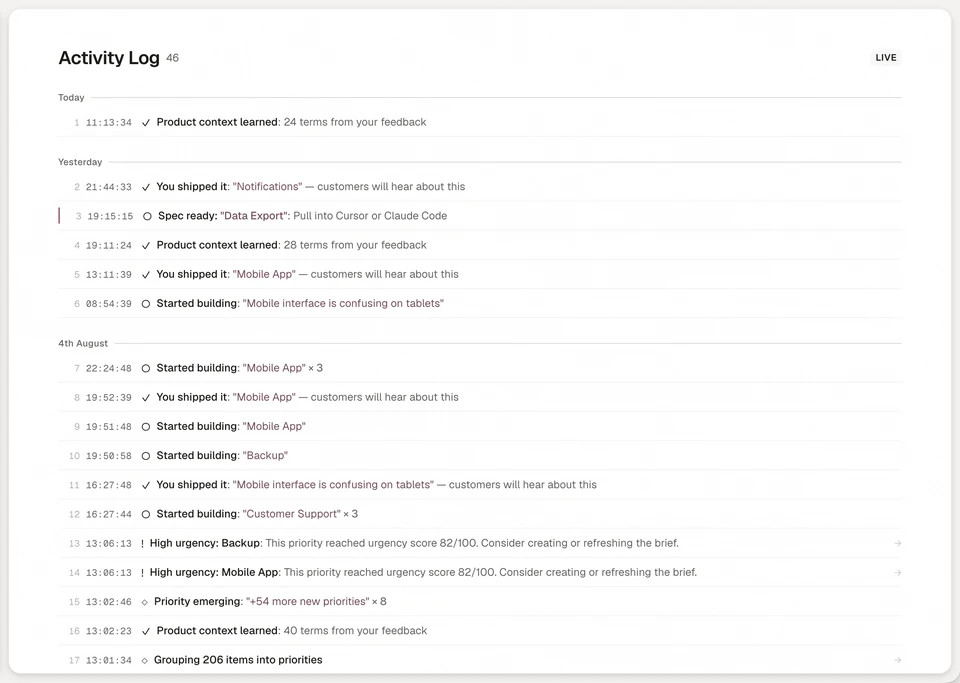
With several agents running, the activity log is the shared record of who did what. Every entry names who acted. A person shows as themselves, and an agent credential shows by its own name, such as Build agent · Claude Code. The Specs Out tab lists each spec created, status change and ship, so on Friday you can see what every agent moved without asking in three chats. Entries are kept for 31 days, and the lasting record stays on the priority: its spec versions, decisions and receipts.
| What you do by hand | What it costs | How Annsa does it |
|---|---|---|
| Keep holders up to date in a shared doc | Two agents start the same job the day the doc is stale | An agent claims a priority, and a second agent can't hold it without taking over with a reason |
| Retell the job, or paste the transcript, for the next session | Context spent on noise, and dead ends tried again | The handoff note sits on the priority, and the next agent, in any tool, reads it with the spec |
| Leave a stopped job marked as held | The job stalls and nobody notices | An agent releases the work with a reason, and the options it ruled out are kept |
| Ask each agent what it did this week | Friday spent reading three chats | The activity log names the person or agent behind each change |
| Answer every question as it arrives | You become the router | Needs You holds only the calls that need a person, and a saved principle reaches every agent |
| Take "done" on trust | Merged work that was never checked | A receipt for each Done When line, with any line the agent couldn't check flagged |
For one plan every agent works from, see AI agent project management.
See how it fits together in Direct your agents.
Questions people ask.
How do you manage multiple AI agents?
How many AI agents can one person realistically manage?
What should you do when agents keep asking for clarification or permission?
How do I manage multiple AI agents without losing track of what each is doing?
How do you stop multiple Claude Code agents overwriting each other's work?
How do I run multiple coding agents at once?
Should I run AI coding agents in parallel or one after another?
What happens when two AI agents edit the same files?
What should an AI agent do when it stops before a job is finished?
What should be shared between AI agents working on one repo?
How does the next agent pick up a handoff?
Keep the plan with the work, whichever agent takes it next.
Begin with one agent and the work that matters next.