Context engineering for AI agents
The short answer
Context engineering is deciding what an AI agent has in front of it when it starts a job: what the project is, what to build, what was already decided and where the code lives. Done well, you write it down once in files every agent reads, so you stop re-explaining the project at the start of every session.
For a product builder, context engineering comes down to 4 pieces: a rules file, a spec for each job, the decisions you've made and the customer evidence behind the work.
- Better prompts don't stop agents asking the same things. A short, stable set of files every agent reads does.
- Put each fact where it changes at the right speed: standing rules in the rules file, this job in the spec, answers in decisions, customers' words in evidence.
- Less is more. A long rules file gets skimmed by people and followed less closely by agents.
- With several agents, one shared copy beats one copy each.
When to use it: as soon as you start a second session on the same project, or a second agent. When not: a one-off script you'll throw away tomorrow doesn't need any of this.
What is context engineering?
Every agent works from what is in front of it: your instructions, the files it opens, the tools it can call and the conversation so far. Context engineering is choosing that on purpose. It asks what this agent needs to know to do this job well, where it will find it and what to leave out so the important parts don't drown.
It is related to prompt engineering, and it is bigger. A prompt is what you type for one task. Context is everything the agent sees: the rules file loaded at the start, the spec it reads, the decisions it looks up and the results of every tool it calls. Anthropic's engineering team described the goal in September 2025 as finding "the smallest possible set of high-signal tokens" that makes the outcome you want most likely. In plain words: give it what matters, and nothing that doesn't.
For coding agents, most of the work is not clever retrieval. It is writing things down in the right place, keeping them short and keeping them true. That is a product job as much as an engineering one, because the most useful context is about the product: who it's for, what customers asked for and what you already ruled out. This guide covers the whole thing. For the narrower question of the product side, see how to give AI coding agents product context.
Prompt engineering or context engineering?
| Prompt engineering | Context engineering | |
|---|---|---|
| The question | How do I word this request? | What should the agent know before it starts? |
| Lasts for | One message | Every session, until you change it |
| Lives in | The chat box | Files and tools every agent reads |
| Who it helps | You, today | Every agent on the project, from now on |
| When it fails | One odd answer | The same wrong guess, every session |
You still need both. A clear request on top of good context gets the best work. But if you find yourself writing the same 3 sentences at the top of every prompt, those sentences are context, and they belong in a file.
Why your agents keep asking the same things
Every new session starts with an empty head. The agent knows how to code, but not your project: what it's for, how you run it, what you ruled out last week. So it asks, or worse, it guesses.
Better prompts don't fix that. A short, stable set of files that every agent reads does.
The three layers of context
- The project, written once. What the product does, who it's for, how to run and test it, and the few rules that never change. One file at the root of the repo.
- The job, written per task. The problem, what to build, the files it touches and Done When. This changes every job, so it lives with the job, not in the project file.
- What was decided. Answers you already gave and options you ruled out, with the reason. This is the layer most setups lose, and it's why agents ask the same question twice.
# Project
What it does, who it's for

## Rules that never change
- Run the tests with this command
- Never edit the generated folder
- Buttons wrap below 768px instead of clipping.
- Keep the toolbar reachable with one thumb.
Done when
- No control is cut off on an iPad in portrait.
- Keep the old export format until March, because 2 accounts depend on it.
Under the job sits a fourth piece that is easy to forget: the evidence. That is the customer's own words, the account that asked and how many others want the same thing. It is not instructions, so it doesn't feel like context. But it is what lets an agent make a good small call on its own, like which of two layouts a customer would recognize, instead of guessing or asking you.
Where each layer lives
- The project file. AGENTS.md is the shared one. Cursor and Codex read it, and Claude Code now reads it too when a repo has no CLAUDE.md. If you already keep a CLAUDE.md, add the line
@AGENTS.mdto it, so Claude Code reads both and the two can't drift apart. - The job plan. A short spec per job (see spec-driven development). Paste it, link it, or keep it where every agent can read it.
- Decisions. A short decisions file or log: the rule, the reason, the date. Agents read it before they ask.
- Buttons wrap below 768px instead of clipping.
- Keep the toolbar reachable with one thumb.
- No control is cut off on an iPad in portrait.
Grok reads AGENTS.md too, so one file covers Claude Code, Cursor, Codex and Grok. Which file to keep, and when to keep both, is in CLAUDE.md vs AGENTS.md.
What are the layers of context, side by side?
| Layer | What it holds | Where it lives | How often it changes | Who writes it |
|---|---|---|---|---|
| Rules file | What the product is, how to run and test it, conventions, what not to touch | AGENTS.md at the repo root, or CLAUDE.md importing it | A few times a month | You, with your agent proposing edits |
| Spec | The problem, what to build, the files it touches, Done When | With the job, where every agent on it can read it | Every job | You, your agent or a tool, then you check it |
| Decisions | Answers you gave, options you ruled out, the reason and the date | A decisions log every agent reads | When you make a call | You; an agent can propose one |
| Evidence | The customer's words, the account, how many asked | Attached to the priority and its spec | When customers write in | Customers, in their own words |
Read the table from the top: each layer changes faster than the one above it. That is the whole rule for where things go. Put a fact in the slowest layer that is still true for it. If you put a fast fact in a slow layer, it goes stale and agents trust it anyway. If you put a slow fact in a fast layer, you write it again every job.
What goes where?
When you're not sure where a line belongs, ask one question about it: how long will this stay true?
- True for every job, for months. "Run the tests with this command." "Never edit the generated folder." "Prices are in cents." That is the rules file.
- True for this job only. "Add a CSV option to the export menu." "Touch these 3 files." "Done when an export of 1,000 rows opens in a spreadsheet." That is the spec.
- True from now on, because you said so. "We're keeping the old export format until March, because 2 accounts depend on it." That is a decision.
- True because a customer said it. "I open the export every Monday to chase late payers." That is evidence, and it belongs next to the job it backs, in their words.
Two lines tend to get misfiled. This week's priorities are not a rule, so they don't go in the rules file. And a decision is not a spec note. If you put "we chose Postgres full-text search over a search service" only in one job's spec, the next agent working on search never sees it. Lift it into the decisions log so every job reads it.
For what a good rules file holds line by line, see CLAUDE.md best practices. The AGENTS.md and CLAUDE.md entries have the short definitions.
How much context is too much?
More is not safer. Agents have a limited attention budget like anyone, and a model's grip on any one line loosens as the pile grows. Anthropic's engineers call this "context rot". Claude Code's docs give a number for its project file: "target under 200 lines per CLAUDE.md file. Longer files consume more context and reduce adherence."
Signs you've given too much:
- The rules file has a history section. Agents don't need the story of how you got here, only where you are.
- The same rule appears in 2 places with different wording. The agent follows one, and you can't tell which.
- You pasted a whole conversation. A transcript is mostly noise. A 5-line handoff note carries the same weight.
- The spec explains the codebase. The agent can read the codebase. The spec should say what's different about this job.
- The agent ignores a rule you know is there. Often that rule is buried. Move it up, shorten it or delete the 3 lines around it.
How long should each piece be?
- Rules file. Under 200 lines, and most good ones are well under 100. If it scrolls for a while, split by folder or move detail into linked docs.
- Spec. About a page for a feature, a few lines for a fix. If the spec takes longer to write than the job takes to build, it's too long.
- Decision. One line for the rule, one for the reason, plus the date. A decision that needs a page is really a spec.
- Evidence. The customer's exact words, short, with who said it. Two or three quotes beat a summary of twenty.
- Handoff note. 5 lines: what's done, what's true now, what's left, the next step and anything risky.
A useful habit is to load context late. Instead of pasting a 40-page product doc into every session, keep a pointer: "the export format rules are in docs/export.md". The agent opens it when the job touches exports. Anthropic's write-up calls this "just in time" context, and it keeps the always-on part short.
What happens when a long session gets compacted?
A long session eventually runs out of room. When it does, the agent summarizes the conversation so far and carries on from the summary. Claude Code does this on its own when the context fills up, and you can ask for it with the /compact command. A summary keeps the gist and drops detail, so anything that lived only in the chat can quietly go missing: the rule you typed an hour ago, the column you said not to touch.
Files survive it. Claude Code's docs say the project-root CLAUDE.md is re-read from disk after /compact, and that an instruction which disappeared "was given only in conversation". So treat the chat as scratch paper. When something you said needs to last past the next summary, put it in the rules file, the spec or a decision, then point the agent back to it after a compaction.
What to leave out
- Anything that changes weekly. It goes stale in the project file and agents trust it anyway.
- Long style guides. Point to the linter instead.
- Whole conversations. A handoff note beats a transcript.
Add 3 more to that list:
- Secrets. Keys and passwords never go in a file an agent reads into its context.
- Things the code already says. If the folder layout is obvious from the folders, don't describe it.
- Wishes. "Write clean code" changes nothing. A rule an agent can check, like "every new endpoint has a test", does.
How do I keep context current?
Stale context is worse than none, because the agent believes it. Keeping it current is a small, regular job, not a quarterly clean-up.
- Fix the file when you correct the agent. If you tell an agent the same thing twice, the second time goes in a file. Ask the agent to propose the line, and you approve it.
- Retire before you add. When a rule changes, delete the old line in the same edit. Two versions of a rule is the most common way a rules file rots.
- Date your decisions. "2026-10-14: keep the old export format until March, because 2 accounts depend on it." A date tells the next reader whether to trust it, and when to check.
- Close the spec when the job ships. A shipped spec is a record, not a plan. If something it learned matters later, lift it into a decision or the rules file. A definition of done for AI agents says when that moment is.
- Read the rules file once a month. Out loud, or with an agent. Anything nobody can explain, cut.
Give each piece an owner. Someone keeps the rules file tidy, usually whoever runs the repo. Whoever holds a job keeps its spec true while it's open. Decisions belong to the person who made them, and only they retire one. Evidence needs no owner, because nobody edits a customer's words. When everyone owns everything, nobody deletes the stale line.
The test is simple. If a new agent read only your files, would it do the right next thing? If not, the gap is the next line to write.
How do several agents share one context?
One agent with good context is easy. Three agents in the same repo is where context engineering earns its keep, because each one starts fresh and none of them hears what the others were told.
Each agent keeps its own copy. Within a week they say different things.
Every agent reads the same file before it starts.
One rules file, not one per agent. Keep the shared rules in AGENTS.md. Claude Code reads it when there is no CLAUDE.md, and a CLAUDE.md can import it with one line. Agent-specific lines go in the agent's own file, below the import. Two hand-copied rules files drift within a week.
One spec per job, read by every agent on it. If Claude Code writes the plan and Codex does the build, they must read the same spec, not their own summaries of it. Keep it where both can reach it, and treat edits to it like edits to code.
One decisions log. A decision made in one agent's chat is lost to the others. Write it where every agent looks before it asks.
Claim the work. Context includes who is doing what. If 2 agents can see the same list but not who holds which job, they will start the same one. Mark the job taken before anyone touches code.
Hand off in writing. When one agent stops and another picks up, the handoff is a short note: what's true, what's left, the next step. Not the transcript.
Let helpers start clean. Some agents can hand a piece of work to a helper agent with a fresh, empty context and get a short summary back. That keeps the main session focused. It also means the helper knows only what you put in the shared files and the task it was handed, which is one more reason to keep those files short and true.
The deeper argument for why this matters, and why more files alone don't fix it, is in your agents don't share a brain. If you run many agents at once, building a lot shows the day-to-day.
A worked example
Say a four-person team with 40 customers runs Claude Code for features and Codex for tests. Their app pulls each customer's orders from their shop overnight and builds a morning report. This is made up, to show where each piece lands.
Before. Every session starts with a paragraph pasted from a notes doc. The notes say the sync runs at 2am every night. A month ago it started skipping nights when the shop was slow to answer, and nobody updated the notes. Claude Code builds a new report filter against the old behavior. Codex asks twice in one week whether the sync can move to live updates, and gets 2 different answers from 2 different people.
What they write down.
- Rules file, 60 lines. What the app does in 2 sentences, the run and test commands, "order totals are stored in cents", "never edit the migrations folder by hand", and a pointer to docs/sync.md for how the sync works.
- Spec for the job. "The morning report always includes last night's orders." Problem in 2 sentences. Evidence: 5 accounts asked, with one customer's words, "my Monday report was missing half of Sunday". Files to touch: 2, checked against the repo. 3 Done When lines, one of them "given the shop times out once, when the sync runs, then it retries and the report is complete by 7am".
- Decision. "2026-10-14: keep the sync nightly, not live, until March, because live updates would hit the shop's rate limit for our 3 largest accounts."
After. Claude Code reads the rules file and the spec, and builds the retry. Codex reads the same spec and writes tests against its Done When lines. When Codex wonders about live updates, it finds the decision and doesn't ask. The notes doc is deleted.
3 weeks later. A customer reports that orders placed during the sync are missing the next morning. Claude Code picks up the fix and reads the same rules file, a new short spec and the March decision, which still holds. It doesn't switch the sync to live. The fix ships with its own Done When lines, and the old sync spec stays closed as a record.
The rules file didn't grow. The spec held the job. The one real decision was written once.
Signs your context is working
- A new session starts the right job without a recap from you.
- Two agents make the same call on the same question.
- You answer each kind of question once.
Signs your context isn't working, and the usual cause
- The agent asks something you already answered. The answer lives in a chat, not a file. Write it as a decision.
- The agent builds the right thing the wrong way. A convention is missing from the rules file, or buried in it. Add it near the top, in one line.
- The agent builds the wrong thing well. The spec says how but not what, or says neither. Start What to build with the outcome.
- Two agents disagree. They read different copies. Find the second copy and delete it.
- The agent follows a rule that stopped being true. Something fast-changing went into the rules file. Move it to the spec or a decision.
- The agent says done and it isn't. The spec has no Done When lines, or they can't be checked. Rewrite them as "given, when, then".
- The agent reads everything and still misses the point. Too much context. Cut the rules file before you add to it.
A context checklist
- One rules file at the repo root, under about 200 lines
- CLAUDE.md, if you keep one, imports AGENTS.md
- Every job has a short spec with Done When lines
- Decisions are written with a reason and a date
- Customer words sit next to the job they back
- No weekly priorities, secrets or transcripts in the rules file
- Every agent reads the same copies
Copy this
Use this as the start of your CLAUDE.md or AGENTS.md.
# Project
<what it does and who it's for, 2 lines>

## Run and test
<commands>

## Rules that never change
- <rule>
- <rule>

## Decided (read before asking)
- <date>: <decision>, because <reason>
Where Annsa fits
Annsa keeps the job plan and the decisions with the work: one spec per job and the answers you've given, which Claude Code, Cursor, Codex and Grok read over MCP before they ask. Your project file stays in your repo. Working with Annsa
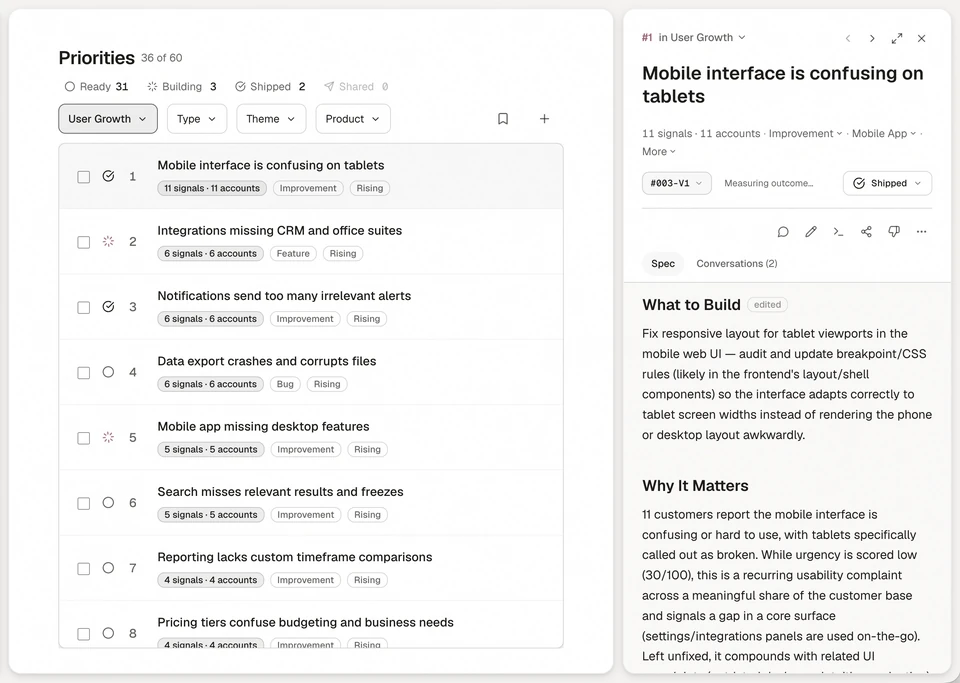
Annsa is the source of direction for agent teams. It holds the 3 layers that change faster than a file can keep up with.
| What you do by hand | What it costs | How Annsa does it |
|---|---|---|
| Paste the plan into each session | Agents build from an old copy | Every agent reads the live spec over MCP |
| Keep decisions in chat | Agents ask again, or guess | Decide once: a saved principle every agent reads |
| Summarize what customers said | Their words get lost in the summary | Evidence stays on the priority: their words, the account and its revenue |
| Tell each agent who's doing what | Two agents start the same job | One agent holds each priority, and the board shows who |
- One spec per priority. Problem, Evidence and direction, What to build, Files to touch and Done When. You, your agent over MCP or Ask writes it. Annsa never writes one on its own.
- Decisions that stick. An answer you give is saved on the spec. A principle applies to every agent from then on. See memory.
See how it fits together in Direct your agents.
Sources
- Anthropic, Effective context engineering for AI agents, 29 September 2025: the smallest set of high-signal tokens; context rot; just in time context.
- Anthropic, How Claude remembers your project: AGENTS.md and CLAUDE.md; the 200-line target; what survives /compact.
- AGENTS.md, a simple, open format for guiding coding agents.
Questions people ask.
What is context engineering?
Is AGENTS.md the same as CLAUDE.md?
Why does Claude Code keep forgetting things between sessions?
What should go in a CLAUDE.md and what should stay out?
What is the difference between prompt engineering and context engineering?
How long should a CLAUDE.md or AGENTS.md file be?
How do I share context between several AI agents?
What are the layers of context for a coding agent?
The source of direction for agent teams.
Begin with one agent and the work that matters next.