Spec-driven development with AI agents
The short answer
Spec-driven development means writing down what to build and how you'll know it's done before an AI agent starts, then keeping that short spec as the source of truth while it works. It isn't a long document. For most jobs it's a problem, the outcome, the files it touches and a few Done When lines.
Annsa is project management and customer feedback software for founders and small teams working with AI agents. Direction for your agents and projects, grounded in your customers and your goals: give Claude Code, Cursor, Codex and Grok one shared plan, and see what shipped. They read the ranked list over MCP and claim the next one.
Spec-driven development means writing a short spec of what to build and how you'll know it's done before an AI agent starts, then keeping that spec as the source of truth while it works. The spec is the brief the agent builds from and the checklist it proves its work against.
- A spec for one job: the problem, the evidence, what to build, the files it touches and Done When lines.
- The loop is spec, plan, build, verify. The spec is written first and checked last.
- Size it to the job. A fix needs a few lines; a feature needs about a page.
- Done When lines turn "done" from a claim into a check.
- It works the same in Claude Code, Cursor, Codex and Grok, as long as every agent on the job reads the same spec.
When to use it: for work customers will use, work that has to last and anything more than one agent touches. When not: for a quick experiment you'll throw away, just prompt and look.
What is spec-driven development?
Spec-driven development, or SDD (some just say spec driven dev), puts a written spec at the center of the work instead of the code. You decide what should be true when the job is done, write it down in plain words and hand that to the agent. The agent plans from it, builds from it and checks its work against it. When the plan changes, you change the spec first.
Today the term almost always means one thing: writing the brief before a coding agent builds. GitHub framed it that way when it released its open source Spec Kit in September 2025, and Birgitta Böckeler, writing on Martin Fowler's site in October 2025, defined it as writing a "spec" before writing code with AI. Thoughtworks put it on its Technology Radar in November 2025 as "an emerging approach to AI-assisted coding workflows", in its Assess ring, for things worth exploring, not yet a settled practice.
Böckeler's 3 levels are the clearest way to see how people use the term now:
- Spec-first. You write a spec for the task, the agent builds from it and the spec is done when the job is.
- Spec-anchored. The spec is kept after the job and updated as the feature changes, so it stays true.
- Spec-as-source. People edit only the spec, and the code is generated from it and never touched by hand.
She found most tools stop at spec-first. Spec-as-source is rare outside a few fields where code generation is trusted. For a small team, the useful middle is a spec-first habit with a light spec-anchored record: write a spec per job, keep it with the job and lift anything that should outlast the job into a decision.
For the short definition, see spec-driven development in the glossary, and product spec for what the document itself is.
Where did spec-driven development come from?
The idea is old. Writing down what software must do before you build it goes back to the early days of software engineering and to formal methods, where specs were precise enough to prove code against. Design by contract made the spec part of the code: each function states what it expects and what it promises. Test-driven development turned the spec into tests you write first.
The name itself shows up in academic work before it became popular. Wikipedia's article cites Ostroff, Makalsky and Paige, who in 2004 presented "an agile approach to specification-driven development" that blended test-driven development with design by contract.
What changed in 2025 was who reads the spec. A person who isn't sure asks a question. An agent fills the gap with a guess and keeps going, fast. So the old habit of writing intent down first came back with a new reason: an agent needs it more than a person did. That is why the current wave of SDD is tied to coding agents and why its tools focus on handing a spec to Claude Code, Codex and the rest.
Critics make 2 fair points. Böckeler found some tools produce so many long files that she would "rather review code than all these markdown files", and called one small bug fix turned into 4 user stories "a sledgehammer to crack a nut". Thoughtworks warned that some tools "generate lengthy spec files that are hard to review". Both point at the same fix: keep the spec short and sized to the job. That is the version this guide teaches.
Why it matters more with agents
A person who isn't sure asks. An agent that isn't sure often guesses, and guesses confidently. A short spec removes the guessing. The agent knows what to build, which files to touch and when it's finished.
There is a second reason, and it grows with every agent you add. Without a spec, each agent builds from its own reading of your request. With 3 agents you get 3 readings. A spec gives them one, and the next agent to pick up the job, in any tool, starts from the same page.
What is the spec-driven loop?
Four steps, in order. The spec is written in the first and checked in the last.
- Spec. Write what should be true and how you'll check it. Problem, evidence, what to build, files, Done When. You can write it, or ask your agent to draft it from your notes and then fix what's wrong.
- Plan. The agent reads the spec and the code and says how it will do the job: the steps, the files, anything risky. You read the plan, not the code, and catch a wrong turn before it costs anything.
- Build. The agent works through the plan. If it finds something the spec didn't expect, it stops and asks, or notes its choice, rather than quietly changing the goal.
- Verify. The agent checks each Done When line on its own and records how: a test, a page on staging, a link you can follow. A line it couldn't check is said so, not skipped.
GitHub's Spec Kit splits the middle further, into specify, plan, tasks and implement. Many tools add a step that breaks the plan into tasks. For one job and one agent, plan and tasks are usually the same thing. What matters is that the loop ends on the spec: the agent checks the work against what you wrote, not against what it remembers you meant.
What a spec has in it
- Problem. What the person experiences.
- What to build. The outcome first, then the direction.
- Files to touch. The parts of the code that change, checked against the repo.
- Done When. Lines in the form "Given a state, when an act, then something you can check". Each one gets checked on its own.
- On tablets, half the toolbar is cut off.
- No control is cut off on an iPad in portrait.
- The layout holds from 768px to 1024px.
What else earns a place?
- Evidence. The customer's exact words, who said it and how many others asked. It lets the agent make small calls the way the customer would want, without asking you.
- Out of scope. One or two lines at the end of What to build on what this job is not. Agents are generous; this stops them adding a settings page you didn't ask for.
- What's decided. Any answer you already gave that bears on this job, like "keep the old column order". Link it rather than copy it.
Who writes it?
Whoever holds the job, and a person reads it before the build starts. You can write it yourself in 10 minutes. You can hand your agent your notes and the customer's words and ask for a draft, then fix what's wrong. Or a tool can draft it from your repo. Each works. What doesn't work is a spec nobody read, because the agent will build exactly what it says. One more rule helps when several people and agents touch a spec: a person's words win. An agent can suggest an edit to a section you wrote, but it shouldn't overwrite it.
What should stay out?
Step-by-step code, unless one choice matters. A tour of the codebase, since the agent can read it. Long background, since the evidence says why in the customer's words. Anything you'd have to update next week, because it belongs in a decision or the rules file instead. For how the spec sits next to your rules file and decisions, see context engineering.
How is a spec different from a PRD or a ticket?
They overlap, and people use the words loosely. The useful difference is size and who reads it.
| Spec | PRD | Ticket | |
|---|---|---|---|
| Covers | One job | A product or a large feature | One task, often part of a job |
| Written for | The agent or person building it | The team deciding and planning | Whoever picks it up |
| Length | A few lines to a page | Several pages | A line or a paragraph |
| Holds | Problem, evidence, what to build, files, Done When | Goals, users, scope, requirements, risks, timing | A title, a description, maybe acceptance criteria |
| Says what done means | Yes, line by line, each one checkable | Usually at a high level | Sometimes |
| Names the files | Yes, checked against the repo | Rarely | Rarely |
| Changes | Per job; closed when the job ships | Over the life of the feature | When the task moves |
A PRD answers "should we build this, and roughly what is it?". A spec answers "build exactly this, here, and prove it". A ticket says "someone do this". When an agent builds, the spec is the one it needs. If you already write PRDs, keep them for the big picture and cut a spec per job from them. How to write a PRD for Claude Code covers the PRD side, and the PRD template gives you a skeleton.
How do I write Done When lines?
Each line names one thing someone can check. The form is "Given a state, when an act, then something you can see." One line, one check. If you can't say how you'd check it, rewrite it.
Some examples, weak then strong:
- Weak: "Export works." Strong: "Given an account with 1,000 invoices, when I choose Export as CSV, then a file downloads with 1,000 rows and opens in a spreadsheet."
- Weak: "Handle errors." Strong: "Given the payment provider returns a timeout, when a customer pays, then they see 'Try again in a minute' and no charge is created."
- Weak: "Make it fast." Strong: "Given the dashboard with 50 projects, when it loads on staging, then the first row appears in under 2 seconds."
- Weak: "Don't break the old export." Strong: "Given an existing scheduled export, when it runs after this change, then the columns are in the same order as before."
- Weak: "Looks good on mobile." Strong: "Given a 390-pixel-wide screen, when I open the export menu, then every option is visible without scrolling sideways."
3 to 6 lines is typical for a feature. A fix often needs 2: one for the bug and one for the thing next to it you don't want to break. Once a line has a receipt pointing at it, don't reword it. Add a new line instead.
The agent records how it checked each line: a test name, a staging URL, a link to a thread. That record is the receipt. For more on the checking side, see definition of done for AI agents, acceptance criteria and Done When.
One line, one check.
How short can it be?
As short as the job allows. A copy fix needs a line. A new feature needs a page at most. If a spec takes longer to write than the job takes to build, it's too long.
How big should a spec be?
Size follows the job, and the job should be one thing you could ship on its own.
| Job | Spec size | Done When lines |
|---|---|---|
| Copy or config change | 1 to 3 lines | 1 |
| Bug fix | A short paragraph, plus the steps to reproduce it | 2 |
| Small feature | Half a page | 3 to 4 |
| Feature across several files | About a page | 4 to 6 |
| Anything bigger | Split it | Each part gets its own |
A good rule: one spec, one pull request. If the work needs 2 pull requests, it is 2 jobs, each with its own spec and its own Done When lines. Splitting early also makes the agent's plan easier to read and the review easier to do.
Spec-driven development vs vibe coding
Vibe coding is prompting and seeing what comes back. It's great for trying an idea. Spec-driven development is for work that has to be right and has to last, or that more than one agent will touch. Many product builders do both: vibe code to explore, then write the spec for the version you keep.
Is it just waterfall?
No. Waterfall plans everything up front. A spec covers one job, and the next job's spec can change because of what this one taught you.
Is spec-driven development the future?
The habit looks set to last. The heavy version is less certain. As agents write more of the code, the scarce part is saying clearly what should be true, and the spec is where that lives. What's still settling is how much spec a job needs. Thoughtworks still has SDD in Assess, and the critics above found tools writing more spec than anyone reads. The safe bet is the short version: one spec per job, written first and checked last. It works with today's agents, and it doesn't depend on any one tool winning.
Which spec tool do I need?
Less than you think. A plain markdown file in the repo is enough to start: one file per job, with the 5 headings from the copy block below. Every agent can open a file, and you can read a diff of it like any other change.
Dedicated spec tools add structure on top. Some give you templates and commands that walk the agent from spec to plan to tasks. Some keep the spec beside the code and check the two still agree. Some tie each spec to the customer request behind it. Those help once you run many jobs at once, or several agents on one job, and want the same shape every time.
Whatever you pick, the loop doesn't change: write the spec, let the agent plan and build from it, check the work against each Done When line, and update the spec when the goal moves. If a tool makes that loop slower to run than a markdown file, it isn't helping yet. The Sources below credit the main write-ups if you want to compare.
Doing it in Claude Code, Cursor, Codex and Grok
Any agent can work from a spec: paste it, link it or keep it in the repo. You can write it yourself, ask your agent to draft it from your notes, or ask a tool to draft it, then edit. What matters is that every agent on the job reads the same one. See spec-driven development in the glossary.
The basics are the same in every tool. Keep the shared rules in AGENTS.md, which all 4 read (Claude Code when there is no CLAUDE.md, or through an import). Keep the spec as a file in the repo or somewhere every agent can reach. Then ask for the loop in so many words: read the spec, say your plan, build, check each Done When line and tell me how.
Claude Code
Start in plan mode, so Claude Code reads the spec and proposes a plan before it edits anything. Approve or correct the plan, then let it build. Put a standing line in your rules file: "Before you say a job is done, check every Done When line in its spec and say how." Claude Code can also draft the spec for you from your notes. If you let it, read it before it builds, because a wrong spec built well is still wrong.
Cursor
Point the agent at the spec file in the chat, so it's in context from the first message, and ask for a plan before edits. Cursor reads AGENTS.md, so the rule about checking Done When lines works here too. If you switch between Cursor and another agent on the same job, the spec file is what keeps them in step.
Codex
Codex reads AGENTS.md, so the standing rules carry over. Give it the path to the spec and ask it to restate the Done When lines before it starts. That catches a misread early. When Codex works on a task in the background, the spec is your only way to steer it, so make What to build start with the outcome.
Grok
Grok reads AGENTS.md too. Hand it the spec the same way, ask for a plan first and a check per line at the end. Nothing about the spec changes from one agent to the next, which is the point.
What mistakes do people make with spec-driven development?
- Writing a long spec for a short job. A fix doesn't need user stories. Size the spec to the job.
- Describing the how and skipping the what. "Add a column to the invoices table" says nothing about what the customer gets. Start with the outcome.
- Done When lines nobody can check. "Works well" isn't a check. Every line needs a state, an act and something you can see.
- Letting the agent write the spec and then not reading it. A generated spec can be confidently wrong. Reading one page is cheaper than unwinding a build.
- One spec per agent. If Claude Code and Codex each keep their own version, you have 2 specs and no source of truth.
- Changing the goal mid-build without changing the spec. If the goal moves, change the spec first, then the code.
- Calling it done when it's merged. Merged means the code landed. Done means each line was checked.
- Keeping the spec forever as a plan. Once the job ships, the spec is a record. What should last goes into a decision or the rules file.
A worked example
Say a four-person team with 40 customers gets the same request from 6 accounts: export invoices as a spreadsheet. This is made up, to show the loop end to end.
Spec. The founder writes it in 10 minutes.
- Title: Customers can export all invoices as CSV.
- Problem: Customers copy invoices by hand into a spreadsheet for month-end. It takes them an hour and they make mistakes.
- Evidence: 6 accounts asked. One customer: "We paste it into the board pack every Friday."
- What to build: An Export as CSV option on the invoices page that downloads every invoice the account can see, one row each, with the same columns as the screen. Not this job: scheduled exports or other file types.
- Files to touch: the invoices page, the export endpoint and its test file.
- Done When:
- Given an account with 1,000 invoices, when I choose Export as CSV, then a file downloads with 1,000 rows.
- Given the file, when I open it in a spreadsheet, then amounts show in dollars, not cents.
- Given an account with 0 invoices, when I choose Export as CSV, then I see "No invoices to export" and nothing downloads.
- Given a user without billing access, when they open the invoices page, then the export option isn't shown.
Plan. Claude Code reads the spec and proposes 4 steps. The founder notices it plans to build the CSV in the browser and asks for the server instead, because of the 1,000-row line. One sentence, before any code.
Build. Claude Code builds it. Codex, on a separate job, reads the same spec to add tests for lines 1 to 4.
Verify. Claude Code checks each line and records a receipt: a test for lines 1, 3 and 4, and a staging link with the opened file for line 2. Everything passes. The founder reads 4 receipts instead of the diff, then tells the 6 accounts it shipped.
Copy this
Start each job from this, and keep it where every agent on the job can read it.
# <title: what becomes true>
## Problem
<1-2 sentences>
## Evidence
<the customer's words, who said it, how many asked>
## What to build
<outcome, then direction>
## Files to touch
- <path> (new|modify)
## Done When
- Given <state>, when <act>, then <check>.
Where Annsa fits
Annsa keeps one shared plan for each job, written by you, your agent or Ask. The spec connects the problem, evidence, work and checks. Every connected agent can read it through MCP and record what it verified. The spec · Writing a spec
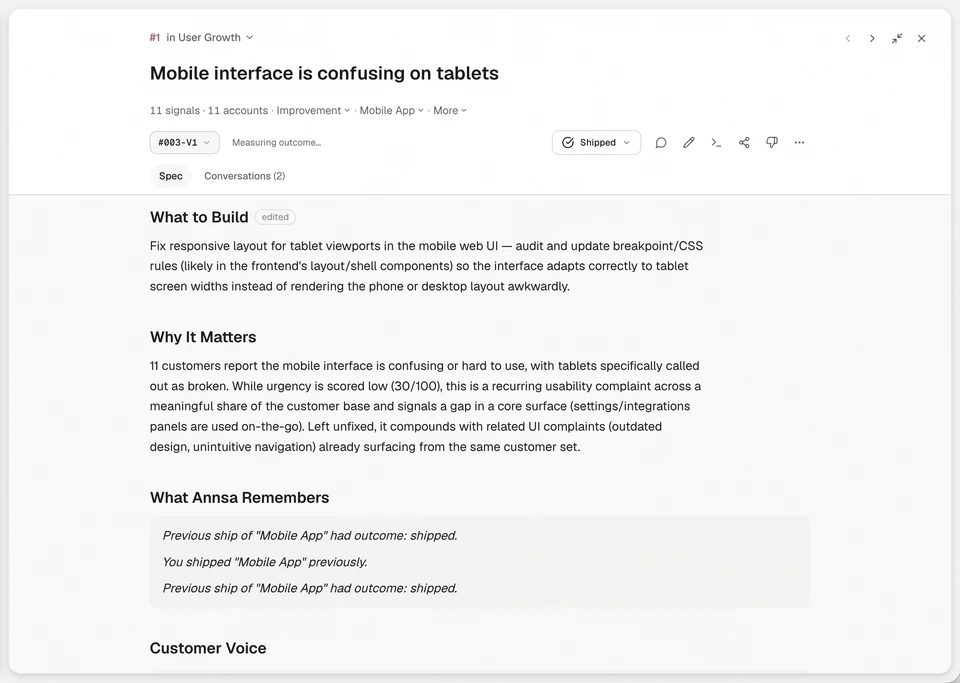
Annsa connects each spec to the customer evidence and priority behind it, so your agents build from the same plan.
| What you do by hand | What it costs | How Annsa does it |
|---|---|---|
| Write a spec from memory of what customers said | Their words get lost | The spec sits on the priority, next to the customers' exact words |
| Paste the spec into each agent | Copies drift | Claude Code, Cursor, Codex and Grok read it over MCP |
| Check the files yourself | The agent starts in the wrong place | Files to touch names real paths, or says Unverified |
| Ask the agent what it checked | Done means whatever it says | A receipt per Done When line, and unchecked lines are labeled |
- 5 sections. Problem, Evidence and direction, What to build, Files to touch and Done When. Out of scope goes at the end of What to build. Annsa never writes a spec on its own, and your words are never overwritten.
- Codebase-aware when you want it. Ask can write a spec from your connected repo.
- Done means checked. Your agent records how it checked each line before it ships. Annsa never deploys.
For the details agents read, see working with specs.
See how it fits together in Direct your agents.
Sources
- GitHub Blog, Spec-driven development with AI: Get started with a new open source toolkit, 2 September 2025.
- Birgitta Böckeler, martinfowler.com, Understanding Spec-Driven-Development: Kiro, spec-kit, and Tessl, 15 October 2025: the 3 levels and the cautions.
- Thoughtworks Technology Radar, Spec-driven development, November 2025.
- Wikipedia, Spec-driven development, citing Ostroff, Makalsky and Paige (2004).
Questions people ask.
What is spec-driven development?
How do I do spec-driven development with Claude Code?
What's the difference between spec-driven development and vibe coding?
Is spec-driven development worth it?
Where did spec-driven development come from?
What is the difference between a spec and a PRD?
What is a Done When line?
What are the three levels of spec-driven development?
How long should a spec be for an AI agent?
More on spec-driven development8 pages
Give the next job a plan your agent can follow.
Begin with one agent and the work that matters next.