Human in the loop for AI agents
The short answer
Human in the loop means an AI agent stops and asks a person before certain decisions, and settles the rest itself. For a product builder running coding agents, the calls worth stopping for are what's in or out, anything touching customers, money, security or data that can't come back, anything against a rule you set, and real choices between options.
Human in the loop means an AI system stops for a person on certain decisions before they take effect, and handles the rest on its own. For a product builder running coding agents, the skill is choosing which decisions stop: few enough that you still read each one, and the right ones, so nothing that matters slips past.
- In the loop, the agent waits for you. On the loop, it acts and you can step in. Out of the loop, it runs alone. Most teams need all 3, for different kinds of work.
- Seven kinds of call should reach a person: scope, customers, money, security, anything that can't be undone, your own rules and real choices between options.
- Write them down as "ask me only if" rules in the file every agent reads. Everything else, the agent settles and notes.
- An ask should take 3 lines and be answerable in 1. Save each answer as a rule, so it isn't asked twice.
- Too many asks is its own failure. After enough approvals, people stop reading.
When to use this: you run Claude Code, Cursor, Codex or Grok on a product with customers, and you're either answering questions all day or finding out about decisions afterward. When not: a throwaway prototype with no users, no data and nothing to lose.
What does human in the loop mean?
Wikipedia's definition is short: "a model requiring human interaction." The phrase has had several homes, and each one adds something useful.
- Simulation. Flight and air traffic simulators put a real person in the loop to test how people work alongside automation, before it goes live.
- Weapons policy. A 2012 Human Rights Watch report, written by Bonnie Docherty, sorted autonomous systems by human control: in the loop, on the loop and out of the loop. Wikipedia's summary of that report says on the loop means "a human may abort an action." This is where the 3-level vocabulary comes from.
- Machine learning. People label data and correct a model's mistakes so the model improves. When a person fixes a misread invoice, that correction becomes training data. Much of what ranks for "human in the loop AI" still means this.
- AI agents. Now the loop is a task, not a training run. An agent plans, uses tools and acts, and the question is which of its actions wait for a person.
So the rules aren't a nice extra any more. They're the loop.
The agent meaning is the one this guide covers. It has made its way into the standards agents are built on. The Model Context Protocol, which Claude Code, Cursor, Codex and Grok use to connect to tools, says "there SHOULD always be a human in the loop with the ability to deny tool invocations." Anthropic's guide to building agents describes the same pattern from the other side: "Agents can then pause for human feedback at checkpoints or when encountering blockers."
Why it matters more now
Until recently, a coding agent worked in front of you, in a terminal you were watching. That made you on the loop by default. In 2026 more of the work happens where you can't see it. Cursor's docs say of its cloud agents, "You can run as many agents as you want in parallel." OpenAI's Codex docs say each cloud task "can keep working while your computer is asleep." Claude Code's docs describe its agent view as "one screen for all your background sessions."
That's good for getting work done, and it changes the loop. When nobody is watching the terminal, the only stops are the ones you wrote down in advance. An agent running overnight will either hit a rule that tells it to ask, or it will decide. So the rules aren't a nice extra any more. They're the loop.
For product builders, the useful version sits higher than a single tool call. You don't want to approve every file write. You want to be asked about the product decisions, and left alone for the rest. See human in the loop in the glossary for the short definition.
The two ways it goes wrong
- Too much loop. Every question comes to you. You become the bottleneck, and your agents wait.
- Too little loop. Agents decide things that were yours, and you find out from a customer.

The fix is the same for both: say which decisions are yours, in writing, and let agents settle everything else.
Both failures have a long history. In 1983 the psychologist Lisanne Bainbridge wrote "Ironies of Automation", about operators in plants run mostly by machines. Her point was that automating most of the work leaves people with the hardest part: watching for the rare moment that needs them, which is tiring, and acting when it comes, with less practice than before. Too much loop wears out the watcher. Too little loop means the watcher isn't there when it counts.
The way out is the same now as then. Make the moments that need a person rare, clear and worth stopping for.
Decisions that need you
- Scope. It changes what's in or out of the job, or the outcome.
- Customers. It affects customers, revenue, security or data that can't come back.
- Your rules. It goes against a rule you set.
- Real options. Two good paths, and the choice is a product call.
Gate by what the action does, not by how sure the agent feels.
Everything else, such as naming, small layout calls or which test to add, the agent settles and notes.
Which calls must always reach a person?
Some calls are yours however good the agent is, because of what happens if it's wrong. Here's how they break down for a small product team. The four kinds above split into seven: customers covers customers, money, security and anything that can't be undone.
| Kind of call | Examples | Why it's yours |
|---|---|---|
| Scope | Adding a setting the spec didn't mention, dropping an edge case to finish faster | It changes what you promised, and what you'll tell people |
| Customers | Any email, message or notice a customer receives, changing words on a pricing page | A message can't be unsent, and it speaks for you |
| Money | Prices, plan limits, refunds, anything that creates or cancels a charge | Mistakes cost real money and trust |
| Can't be undone | Deleting data, running a migration on production, rotating a key, force-pushing a shared branch | There's no undo, so there's no review afterward |
| Security | Access rules, who can see whose data, secrets | The cost of a miss is unbounded |
| Your rules | Anything that breaks a principle you wrote down | Either the rule is wrong or the action is |
| Real options | Two designs that both work, with different tradeoffs | It's a product call, and you hold the product |
A test for anything not on the list: if it's wrong, can it be undone in minutes, without a customer noticing? If yes, the agent decides and notes. If no, it asks.
Notice what is not on the list: how sure the agent feels. Gate by what the action does, not by how sure the agent feels. Agents are often confident and wrong, and a confident agent emailing your customers is the scenario you're guarding against.
Human in the loop vs human on the loop
In the loop, the agent waits for you on certain calls. On the loop, the agent acts and you review afterwards. Most product builders want both: in the loop for the four kinds of decision above, on the loop for everything else, with a clear record of what was done. See human in the loop in the glossary.

Here are all 3 levels side by side, as they apply to coding agents.
| In the loop | On the loop | Out of the loop | |
|---|---|---|---|
| What the person does | Approves before it happens | Watches the record and can step in or undo | Nothing, unless something breaks |
| When the action takes effect | After the answer | Straight away | Straight away |
| Fits | Scope, customers, money, anything that can't come back, real options | Code changes inside the spec, tests, small layout and naming calls | Formatting, lint fixes, rerunning a flaky test |
| Example | "Email the 40 accounts on the old plan?" | The agent refactors the export code and notes why | The agent fixes a typo the linter caught |
| What it costs | Your attention, and the agent's wait | A record you have to be able to read | Mistakes nobody sees until later |
The table isn't a ladder where more loop is safer. Each level fits a kind of work. Putting a lint fix in the loop wastes your attention, and that attention is what keeps the real calls safe.
How do you write "ask me only if" rules?
Rules live in the file every agent reads at the start of a session. AGENTS.md is the shared name: Codex and Cursor read it, and Claude Code reads it when there's no CLAUDE.md. Write the rules there once, rather than in every chat.
A good rule has 4 qualities:
- It names a kind of action. "Before sending anything to a customer" works. "When unsure" doesn't, because the agent decides when it's unsure.
- An agent can tell if it applies. "Anything risky" is a feeling. "Anything that deletes rows on production" is a test.
- It says what to do instead. Ask, then carry on with the safest option, or stop that part and keep working on the rest.
- It's short. A long rules file gets skimmed by agents as much as by people. Anthropic's Claude Code guide warns that bloated rules files cause instructions to be ignored.
Here are rules that work, next to rules that don't:
| Doesn't work | Works |
|---|---|
| Ask me if you're unsure. | Ask me before changing what's in or out of the job. |
| Be careful with customer data. | Ask me before deleting, exporting or changing customer data on production. |
| Don't do anything risky. | Ask me before any action you can't undo in minutes: migrations, deletes, force-pushes. |
| Check with me on emails. | Never send to a customer. Draft it and ask me. |
| Use good judgment on design. | When there are two good designs, show both with your pick, and ask. |
It helps to write the other 2 lists as well. A short "never" list: things the agent doesn't do even if a chat seems to ask for it, such as merging to the live branch or sending a customer message. And a "decide and note" list, which tells the agent it's allowed to settle naming, small layout calls and which tests to add. Without that permission, careful agents ask about everything.
If a rule must hold with no exceptions, back it with a setting, not just a sentence. Agent permissions, a sandbox or a protected branch enforce what a rules file only asks for.
What permission and sandbox settings should you use?
Coding agents come with 3 kinds of setting, and they do the enforcing a rules file can't.
- Permission modes. Most agents can ask before every file edit or command, or run some kinds of action without asking. Start strict on a new repo and loosen it as you see what the agent does.
- An allowlist. Name the commands the agent may run without a prompt: the test runner, the linter, the build. Leave anything that deploys, deletes or pushes off the list, so it always asks.
- A sandbox. A sandbox limits which files and network addresses the agent's commands can reach, whatever the command says. Claude Code's docs point to sandboxing "for filesystem and network enforcement that doesn't depend on the command text."
The aim is the same as your rules: the small stuff runs on its own, and the risky stuff sits behind a prompt you'll still read.
For a ready-made list to paste, use the human-in-the-loop checklist.
“When unsure” doesn't, because the agent decides when it's unsure.
How an agent should ask
Three lines: the topic, the question, and the options with the one it would pick. You should be able to answer in one line. One open question per job at a time, and the agent keeps working on anything that doesn't depend on the answer.
- Old export files
- Delete the 2,300 export files older than a year from storage?
- A, delete them. B, move them to cold storage. C, leave them. (I'd pick B: it frees the space and nothing is lost.)
Here's the shape, with a made-up example:
- Topic: Old export files
- Ask: Delete the 2,300 export files older than a year from storage?
- Options: A, delete them. B, move them to cold storage. C, leave them. (I'd pick B: it frees the space and nothing is lost.)
That ask has everything you need to answer in a few seconds. Compare it with "I noticed some old files in storage, what would you like me to do with them?", which starts a conversation instead of ending one.
What if you're not there? The agent shouldn't wait idle, and it shouldn't take the answer as given. It carries on with everything that doesn't depend on the ask, leaves the risky step undone and puts the open question at the top of its next update. When you come back, you answer once and the work moves. That's why the shape matters: an ask written for someone reading it cold, hours later, is one you can still answer in a line.
Two more habits keep asks cheap. The agent says what it will do while it waits, so you know nothing is stalled. And if your answer raises a new question, it asks again in the same shape rather than guessing. An unanswered ask never turns into a yes.
Answer once
Save each answer as a rule, with the reason. The next agent reads the rule before asking. Over time fewer questions reach you, because the settled ones stay settled.
The reason matters as much as the rule. "Move old files to cold storage, never delete, because a customer asked for a 2-year-old export last spring" lets the next agent handle a slightly different case without asking. "Don't delete files" alone tells it nothing about logs, caches or test data.
Keep each rule narrow enough to be true, and testable enough that an agent can tell whether a new question falls under it. A principle that settles a recurring question is worth more than 10 answers given in chat, because chat answers disappear with the session.
How do you avoid approval fatigue?
Approval fatigue is what happens when you're asked so often that you stop reading. Anthropic's Claude Code guide puts it in one line: "After the tenth approval you're clicking through rather than reviewing." At that point you're still technically in the loop, but nobody is reviewing. The EU AI Act names the same risk in its human oversight rules for high-risk systems: people must stay aware of the "automation bias" that comes from over-relying on a system's output.
The fixes are about volume and shape, not willpower:
- Treat your attention as a budget. If you get more than a handful of asks a day, the rules are too loose. Move a kind of question to "decide and note".
- Gate by what can't be undone. Reversible work runs on the loop, with a record. Irreversible work waits.
- Show the consequence, not the command. "This deletes 2,300 files" is reviewable. A raw command line isn't, for most people.
- Never bundle. One decision per ask. A risky step hidden in a batch of harmless ones gets approved with them.
- Turn repeats into rules. If you've answered the same kind of question twice, write the principle.
- Let the tools take the small stuff. Allow the commands you trust in your agent's permission settings, and run agents in a sandbox or their own branch, so file edits and test runs never reach you as questions.
- Watch your own answers. If you approve everything within seconds, either the asks are too easy or you've stopped reading. Both mean the rules need work.
The goal isn't zero asks. It's that every ask that reaches you is one you'd want to have seen.
“After the tenth approval you're clicking through rather than reviewing.”
What does this look like in a week?
Here's a made-up example. Say a solo founder runs Claude Code and Codex on a scheduling app with 25 paying customers. On Monday she counts 14 questions from her agents, and loses the afternoon to them.
She sorts them:
- 9 were small calls. Naming a component, which test to add, whether a button sits left or right. None needed her.
- 2 she'd answered the week before, in a different session, so the new agent didn't know.
- 3 were real: raising the free plan's booking limit (money), emailing customers about a calendar change (customers) and deleting a table of old reminders (can't be undone).
So she writes 7 lines in AGENTS.md: ask about scope, customers, money, security, anything that can't be undone, a broken rule and real options. Decide and note everything else. She saves the 2 repeat answers as rules with their reasons. And she adds "never send to a customer; draft it and ask me".
By Friday her agents ask about 3 times a day. Each ask fits in 3 lines, and most take her under a minute. One of them, about the reminders table, saves her: the agent had found a cheaper fix that would have deleted reminders still in use, and asked first because of the rule.
On the loop is still doing work too. On Wednesday she reads the agents' notes and sees one renamed an event type customers can see. Not on her list, but she undoes it in a minute and adds "names customers see" to the customer rule. That's the system working: the record caught it, and the rules got a little better.
What mistakes do people make with human in the loop?
- Gating by confidence. "Ask when unsure" lets the agent decide when to ask. Gate by the kind of action instead.
- Approving tool calls instead of decisions. A prompt for every file write teaches you to click yes. Save your attention for product calls.
- Answering in chat only. The answer leaves with the session, and the next agent asks again. Save it as a rule.
- No record for on-the-loop work. If you can't see what an agent did, you're out of the loop, not on it.
- Treating silence as a yes. An ask nobody answered isn't approval. The agent carries on with what doesn't depend on it and leaves the risky step undone.
- Open-ended asks. "What should I do?" costs you a conversation. Ask for options and a pick.
- Several open asks on one job. They pile up and contradict each other. One at a time per job.
- A rules file nobody prunes. Rules that no longer apply hide the ones that do.
Copy this
Paste this into your CLAUDE.md or AGENTS.md, so every agent knows which calls are yours.
## Ask me only if
- it changes what's in or out, or the outcome
- it affects customers, money, security or data that can't come back
- it goes against a rule in this repo
- it's a real choice between options

## How to ask
Topic: <one line>
Ask: <the question, one line>
Options: A - <...>  B - <...>  (I'd pick: <A/B>)

## Everything else
Decide, note what you decided, and carry on.
For a longer version, with a "never" list and what to do while waiting, use the human-in-the-loop checklist. To see this alongside claiming and handoffs, read how to manage multiple AI agents.
Once your calls are made and the work ships, the next job is finding out whether it helped: see how to measure feature success.
Where Annsa fits
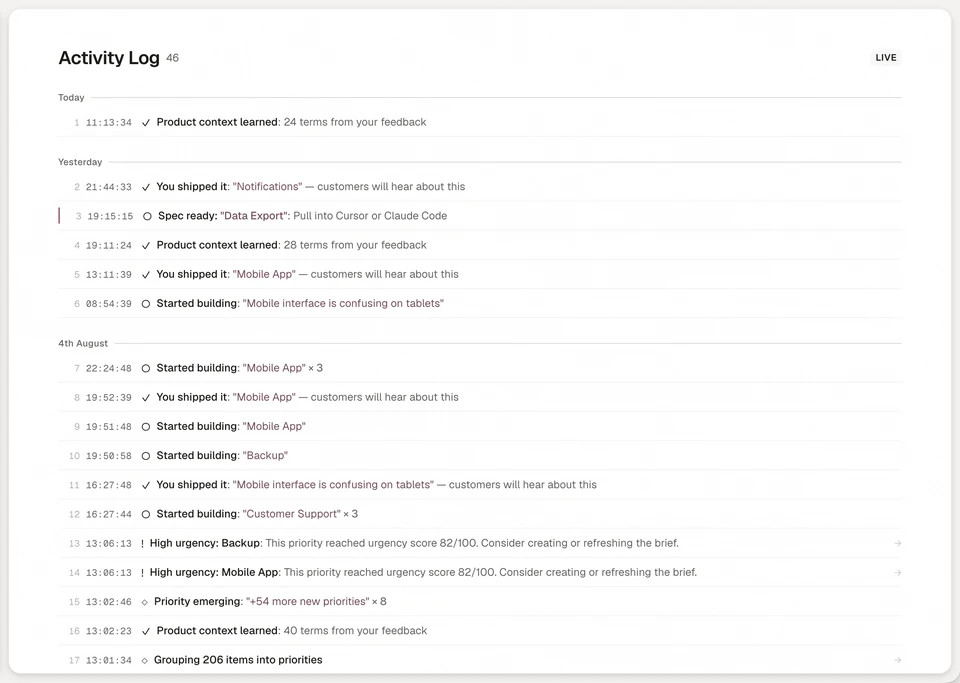
Annsa's Needs You list holds the questions your agents raise, each in that three-line shape with the options. You answer in the app or from your terminal, and you can save an answer as a principle every agent reads before asking. Needs You
- An agent asks only when a choice changes scope, touches customers, revenue, security or data that can't come back, goes against a principle or is a real choice between options. It checks the spec first, in case an answer or principle already settles it. See asking you a question.
- A security question always comes to you, whatever your principles say.
- Each priority carries one open ask at a time. The agent keeps working on anything that doesn't depend on your answer, and your answer lands on the spec every agent reads.
- Needs You also holds spec updates to approve and shipped work that came back.
- Some steps stay with a person. When an agent uses its own agent credential, it can't answer an ask, sign, park or share; share is on that list because an email can't be unsent. Annsa never contacts customers on its own. See what your agent can do.
- On the loop, the activity log names who did what, a person or a named agent, so you can review afterward. An agent on your own sign-in acts as you, with your rights, and shows as you.
| What you do by hand | What it costs | How Annsa does it |
|---|---|---|
| Answer agent questions across several chats | Your day goes to questions, not decisions | One Needs You list, each ask in 3 lines with a pick |
| Repeat last week's answer to a new session | The same question, again | Save the answer as a principle every agent reads first |
| Trust agents not to email customers | One message you can't take back | Sharing stays with a person; agents draft, you send |
| Piece together what an agent did | You find out from a customer | An activity log that names each person and agent |
See how it fits together in Direct your agents.
For the product page, see Needs You.
Sources
- Definition and history: Human-in-the-loop, Wikipedia, citing Bonnie Docherty, Human Rights Watch, 2012.
- Lisanne Bainbridge, "Ironies of Automation", Automatica 19(6), 1983. Summary: Ironies of Automation, Wikipedia.
- Model Context Protocol specification: Tools, 2025-06-18.
- Anthropic, Building effective agents, 19 December 2024.
- Anthropic, Best practices for Claude Code.
- Anthropic, Claude Code docs: Agent view and Configure permissions.
- EU AI Act, Article 14: Human oversight.
Questions people ask.
What is human in the loop?
Which AI agent decisions need a human?
How do I stop being the bottleneck for my AI agents?
Why do agents keep asking me the same questions?
What is the difference between human in the loop and human on the loop?
Where does the term human in the loop come from?
What is approval fatigue?
Should an AI agent ask when it is unsure?
What should an AI agent do while it waits for an answer?
More on only your calls reach you6 pages
The source of direction for agent teams.
Begin with one agent and the work that matters next.