Customer feedback loop: how to close it with the people who asked
The short answer
To close the customer feedback loop, keep who asked for each request in their own words and link it to the work. When the work is live, send each person a short note that names what they asked for and what changed. A clear no closes the loop too. Measure it as who asked against who was told.
You built the thing a customer asked for. They still think you ignored them. The fix is to keep who asked for each request in their own words, link that request to the work and, when the work is live, send each person a short note that names what they asked for and what changed. Most teams collect and build well, then skip the last step, so the people who asked never hear.
TL;DR
- The loop has six stages: collect, keep the words, link to the work, decide, ship, tell. It almost always breaks at the last one.
- Tell the people who asked first, one note each, after the change is live. Release notes are for everyone else.
- A "we won't build this" reply closes the loop too. Silence does not.
- Measure it with one count per shipped item: who asked, and who was told.
This page is the how-to. For the short definition, see customer feedback loop and closing the loop.
What does the customer feedback loop look like end to end?
Six stages, in order. Each one has a way it breaks.
| Stage | What you do | Where it breaks |
|---|---|---|
| 1. Collect | Take feedback from wherever it arrives: calls, support, Slack, email, surveys | It lands in five places and nobody sees it all |
| 2. Keep the words | Save the customer's exact words, the person, the account | Someone writes a summary and drops the name |
| 3. Link to the work | Attach the request to the priority it supports | Requests sit in a separate pile from the work |
| 4. Decide | Build it, not now or no | No decision, so nobody knows what to say |
| 5. Ship | Build it, then check it is live for customers | Merged gets mistaken for live |
| 6. Tell | A short note to each person who asked, then the public release notes | Skipped, because the team has moved on |
Stage 2 is the one that makes stage 6 possible. If you cannot say who asked, you cannot tell them. And the note lands far better when it quotes their words back, so keep the words, not a paraphrase.
Bain, which calls this follow-up the "inner loop" in its work on Net Promoter, describes the step of "closing the loop between company and customer by calling the customer back". Its focus is speed: "Delaying feedback by several weeks blocks the opportunity to learn and improve."
Why do most teams never close it?
Not because they do not care. Because the last step costs the most and arrives at the worst moment.
- Nobody kept who asked. The request was summarized into a ticket, and the name fell off. Months later the work ships and the list of people is gone.
- The work and the request live apart. The feedback sits in a support tool or a doc. The work sits in the code and the board. Joining them at ship time means searching by hand.
- Shipping feels like the finish line. By the time it is live, the team is on the next thing. Telling people is admin, and admin waits.
- Nobody owns it. Product thinks support will tell them. Support thinks product will. Everyone thinks the changelog covers it.
- The answer was no. Saying no feels awkward, so nobody says anything. The customer assumes they were ignored.
- It shipped a little differently. The thing you built is not quite what they asked for, and writing that note takes thought.
None of these is fixed by caring more. Each one is fixed by keeping the right record earlier. If the request is linked to the work with the person attached, the list of who to tell exists the day it ships.
How do you keep who asked, so you can tell them later?
The telling step is only as good as the record you kept months earlier. Five fields per request are enough:
| Field | Example | Why it matters at ship time |
|---|---|---|
| Their words | "I re-type every invoice into my accounting tool on Fridays" | The note quotes it back, so they know it was read |
| The person | Maya, finance lead | You write to a person, not an account |
| The account | A 12-seat customer on an annual plan | Tells you who else there to tell, and how much it matters |
| Where it came from | Support thread, 14 March | Lets you reply in the same place, and find the context |
| What it is linked to | The priority for CSV export | The list of who to tell builds itself when that priority ships |
Three habits keep the record usable.
Link, don't copy. When three customers ask for the same thing, link all three requests to one piece of work instead of writing one summary. A summary keeps the idea and loses the people.
Keep the words exactly. "Export to CSV" is your summary. "I re-type every invoice on Fridays" is the customer's problem. The second one makes a better note, and it also tells you whether the thing you built solved it.
Record the decision on the request. When you decide not now or no, write it where the request lives. Then a teammate who talks to that customer next week knows the answer, and the won't-build note can go out the same day.
If you track requests in a sheet today, add a column for the linked work and one for "told". That alone turns the end of the loop from a search into a filter. For triage habits that keep the list clean as it grows, see feature request triage.
Who should you tell, and when?
Tell the people closest to the request first, and only once it is live.
| Who | When | How | What they need |
|---|---|---|---|
| The people who asked | The day it is live for them | A note to each person, by email or in the product | Their words, what changed, where to find it |
| Their account owner or your teammate who logged it | Before or with the customer note | A message inside the team | What shipped, so they can mention it on the next call |
| Accounts who would use it but never asked | The same week | In-product notice, a short email to that group | What it does for them, in one line |
| Everyone | On your normal release rhythm | Release notes, changelog | What changed, grouped by new, improved and fixed |
| People who asked for something you won't build | When you decide | A personal note | The answer, the reason, an alternative if there is one |
Two timing rules matter more than any others.
Tell after it is live, not after it merged. Merged code can sit behind a deploy, a flag or a review for days. A note that says "it's ready" when it is not costs more trust than no note. Open the product as a customer would and check before anything goes out.
Tell soon after it is live. The longer the gap, the less the customer remembers asking, and the more likely they found a workaround or a different product. A day or two is good. A month later is still better than never, and it is worth saying "you asked about this in March" so they can place it.
Which feedback needs a reply?
You can't reply to everything, so pick on purpose. Always reply to:
- A named problem. Someone told you what broke or what got in their way. They should hear what you did about it.
- A cancellation or a downgrade. The reason they gave is the most useful sentence you will get from them, and a reply is your last chance to show it was read.
- A low score with a comment. The comment is a request. Treat it like one.
- A request you act on. Build it, decline it or put it behind something else, and say which.
Skip the reply when there is nobody to route it to: anonymous feedback, an empty survey response or a score with no words. Count those, read them in bulk and let them shape what you look at next. A short "thanks, we read this" to a request you have not decided on yet is fine, as long as you write again when you do decide.
What do you write?
A good note is short and about them. Five parts, and most notes need only four.
- What they asked for, in their words. "In March you asked if you could export invoices to CSV."
- What changed. "You can now. It's under Billing, Export."
- How to use it, in one line. "Pick a date range and you'll get one row per invoice."
- What is different from what they asked, if anything. "It doesn't include line items yet."
- An easy way to reply. "If it doesn't do what you needed, reply to this and tell me."
Keep it to a few lines. Name the thing they will see, not how it was built. Send it from a person, and make replies go to a real inbox.
For copy you can paste, use the new feature announcement template, which has a short version for the people who asked and a broader one for everyone else, and the three emails in feature shipped email templates: one request, many people asking for the same thing and shipped differently from what they asked.
Subject lines that work
Say what they get, in their words. "CSV export is live" beats "Product update, October". If several people asked, still send each person their own note, so the subject can be about their request.
What if many people asked for the same thing?
Still one note each, because each person asked in their own words. Most of the note can be the same. The first line changes: it quotes what that person said, or names the problem they described. If 30 people asked, that is 30 first lines and one shared body, and it takes far less time than it sounds.
What if the person who asked has left the company?
Write to the account's main contact instead, and say who raised it: "Your colleague Sam asked for this in April." The account still benefits, and the new contact learns that feedback from their team gets read. If nobody is left to tell, note it on the request and move on. A closed record is better than an open question.
What if someone on your team logged it for them?
Tell the teammate first. Often the best note comes from the person who heard the request on a call, because the customer knows them. Give them the facts and the draft, and let them send it.
Should you send release notes or a note to each person who asked?
Both. They do different jobs, and one does not replace the other.
| Release notes | A note to each person who asked | |
|---|---|---|
| Who reads it | Everyone, including people who never asked | The people behind the request |
| What it says | Everything that changed, grouped | The one thing they asked for |
| Voice | Public, the product talking | Personal, a person talking |
| Their words | No, it is written for everyone | Yes, quoted back |
| What it earns | Awareness | Trust, and the next piece of feedback |
| When it goes out | On a rhythm: weekly, monthly | When their request is live |
| What happens if you skip it | People miss what is new | The person thinks they were ignored |
The common mistake is the left column standing in for the right. A changelog entry reaches the people who read changelogs. The person who asked six months ago is rarely one of them, and even if they see it, it does not tell them they were heard. For the public side, see how to write release notes and release notes.
How do you reply when you won't build it?
A clear no closes the loop. Silence leaves it open forever, and the customer fills the gap with "they ignored me".
A good no has three parts: the answer, the reason in a sentence and what they can do instead.
"You asked for a mobile app back in May. We've decided not to build one this year. Most of our customers use the product at a desk, and we'd rather make that faster. If you're on the go, the web app works on a phone browser. If that changes for you, reply and tell me, because I keep these."
Three other replies close a loop too:
- Not yet. "This is on our list, behind two things that are broken for other customers. I'll write when it's live." Only send this if it is true, and only if you will write again.
- Shipped differently. "We didn't build the exact thing you asked for. Here is what we did, and why we think it solves the same problem." Be honest about the gap and ask whether it works for them.
- Already exists. "You can do this today. Here is where." It happens more often than you would think, and it is a sign of a feature discovery problem worth noting.
If the person left a low rating about a bug you have now fixed, ask whether they would like to update it. Never ask them to change it.
Avoid promising a date or a feature nobody has decided to build. A broken promise reopens the loop worse than it was.
What changes when agents ship faster?
When Claude Code, Cursor, Codex or Grok do the building, a team can ship many small things a week. Three things follow.
- More loops to close. The telling step did not get faster when the building did. If it was skipped at four ships a month, it will be skipped at twenty.
- Merged and live drift further apart. Agents open and merge pull requests quickly. Whether the change is live, behind a flag or rolled back is a separate fact. Check live before the note.
- Drafting got cheap, checking did not. An agent can draft a note in seconds. Knowing who asked, and confirming the note is true, still takes a person. Keep a person on the send.
The practical change: batch the telling. Once or twice a week, list everything that went live, find who asked for each and send the notes in one sitting. The closing the feedback loop audit is a 10-minute version of this for the last 30 days.
How do you measure whether you closed the loop?
With a count, per shipped item: who asked, and who was told. This is where "who asked" earns its place. It is the list you owe a note to.
| Measure | How to count it | What it tells you |
|---|---|---|
| Told rate | People told ÷ people who asked, for items shipped this month | Whether the last step happens at all |
| Time to tell | Days from live to note sent | Whether the note arrives while they still remember asking |
| Won't-build replies | Declined requests where the person heard ÷ requests you declined | Whether you close the hard loops too |
| Replies | Notes that got an answer | Whether the note invites the next piece of feedback |
| Came back | Shipped items where customers raised the same problem again | Whether the ship solved it |
Start with the told rate. If you have never counted, run it on last month: list what shipped, list who asked for each, mark who heard. Most teams find the number lower than they guessed.
The last row links the loop to whether the work landed. If people who were told come back with the same problem, the ship did not solve it, and that is a new loop. For checking whether a ship worked, see how to measure feature success.
A worked example
This is hypothetical. Say a four-person team with 60 customers ships 14 things in October with help from two coding agents.
Before. They post one changelog entry a week. Nobody sends personal notes. At the end of the month they run the count. Nine of the 14 items had at least one customer behind them, 23 people in all. Two of those people saw the changelog and said so. The told rate is 2 of 23.
The change. Every Tuesday and Friday the founder spends 20 minutes on telling. She lists what went live since the last sitting and checks each one in the product. She finds who asked, from the request linked to each priority. She sends one note each, quoting their words. For the two requests they declined that month, she sends a won't-build note with the reason.
After a month. The told rate is 21 of 23. The two misses had no email on file. Time to tell is under three days. Seven people replied, and three of those replies were new requests, now linked to the work. One person said the export still did not include the column she needed, and that priority reopened with her words on it.
None of this needed new software. It needed the request linked to the person, and two short sittings a week.
What are the common mistakes?
- Calling a changelog entry a closed loop. It reaches people who read changelogs. The person who asked is not usually one of them.
- Telling people before it is live. A wrong "it shipped" note is worse than no note.
- Writing about the build instead of the change. "We refactored the export service" means nothing to them. "You can export invoices now" does.
- One mass email to everyone who asked. It reads as a broadcast. Send one note per person, even if the words are close.
- Only closing the happy loops. The no and the not-yet replies earn as much trust as the shipped ones.
- Promising what nobody decided. "This will be in next month's release" turns into a broken promise.
- Losing the reply. A note that sends from a no-reply address tells them you do not want to hear back.
- Never counting. Without who asked and who was told, you cannot tell whether the step happens at all.
A checklist for each shipped item
- It is live for customers, checked in the product, not only merged.
- Each person who asked gets their own note: their words, what changed and any gap from what they asked.
- Replies go to a real inbox, and the teammate who logged it knows.
- You marked who was told, so the count is right.
For a 30-day count on one sheet, use the closing the feedback loop audit.
How does Annsa do it?
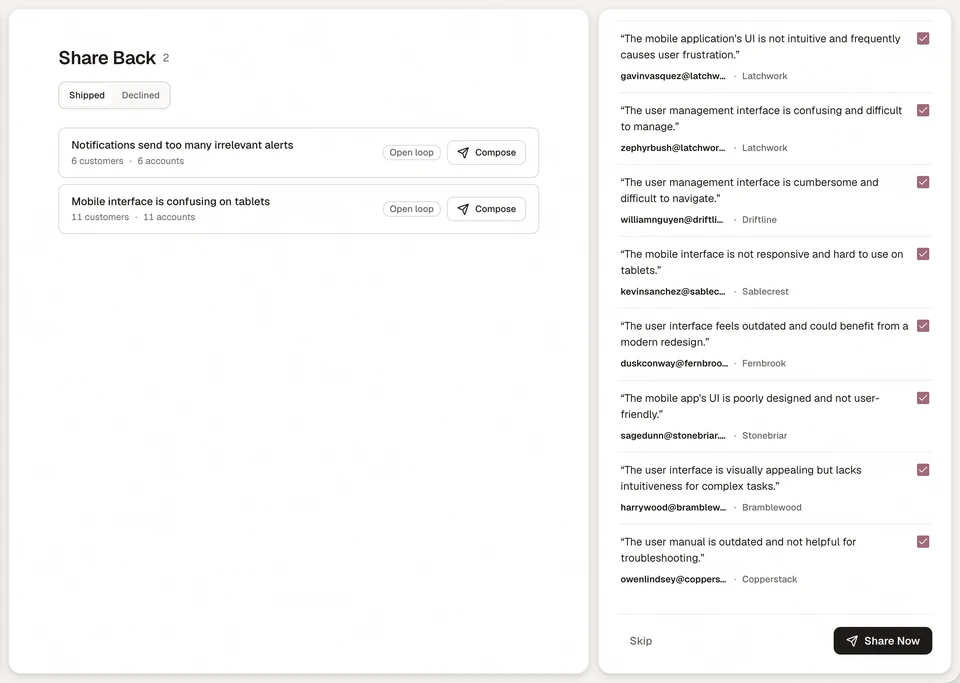
Annsa is AI agent management, the source of direction for your team and agents. It keeps stages 2 and 3 of the loop as you go, so stage 6 is a review, not a search.
- Who asked stays with the work. Every request keeps the customer's exact words, the person, the account and its revenue, linked to the priority it supports. That is the evidence that ranks the work, and it becomes the list of who to tell.
- Share Back drafts the notes. When a priority ships, Share Back drafts one note per customer behind it, quoting their words and saying what was built. You review each draft, change the wording, add a line of your own or take someone off the list, then send by email, the in-app widget or both.
- You send it. Annsa never contacts customers on its own. Automatic sending exists as an account setting and is off by default. Agent credentials cannot send a note to a customer, because an email cannot be unsent.
- Replies come back. Replies go to your team inbox. If customers raise the same problem after you told them, the priority reopens as came back, with the last ship on its row.
- Release notes are separate. Ask your agent to cut a release and it collects everything shipped since the last one and writes a changelog summary. Cutting a release sends nothing to customers. See releases.
- The count is visible. The Customers page shows each person's requests and the updates they have been sent.
| What you do by hand | What it costs | How Annsa does it |
|---|---|---|
| Search old tickets and calls for who asked | An hour per shipped item, or it gets skipped | Who asked is linked to the priority when the feedback arrives |
| Write each note from scratch | An afternoon a week | Share Back drafts one note per person, in their words |
| Keep a sheet of who was told | It drifts within a month | Each customer's record shows the updates they were sent |
| Notice when a fix did not land | You hear months later, if at all | The priority reopens as came back when customers raise it again |
See Share Back and Share Back in the docs.
Sources
- Bain and Company, The Net Promoter System's "Inner Loop": calling the customer back, who to call first and why speed matters.
Questions people ask.
How do you close the customer feedback loop?
What are the stages of a customer feedback loop?
Is a changelog enough to close the loop?
How soon after shipping should you tell the customer?
How do you tell a customer you won't build their request?
How do you measure closing the feedback loop?
A guide to telling people it shipped.
- 01
What does closing the loop mean?
Telling the customer who gave feedback what happened because of it: what you changed, what you shipped, or why you won't.
- 02
How do I do it every time, not once in a while?
Start with a count: what you shipped in 30 days, who asked, who was told.
- 03
What do I write to the people who asked?
A short note: what changed, who it is for and how to use it. Copy one of three emails for the day it ships.
- 04
What goes in the public release notes?
Lead with what changed for the reader, group by new, improved and fixed, and send the people who asked their own note.
- 05
Can I stop writing every note by hand?
Annsa shows who asked and drafts a note to each person. You review it and send it.