How to measure feature success after launch
The short answer
Decide before you build what worked means: a Done When line, one number with a threshold and the people who asked. Then check after a day, a week and a month. A feature worked when the people it was for found it, kept using it and stopped raising the problem it was built to fix.
To measure feature success, decide before you build what "worked" means: one Done When line, one number and the people who asked. Then check it after a day, a week and a month. A feature worked when the people it was for found it, kept using it and stopped raising the problem it was built to fix.
TL;DR
- Shipped is not done. Merged, live, used and worked are four different facts, and only the last one is the point.
- Write down what "worked" means before the work starts. If you decide after, you will pick whatever number looks good.
- Look at four things in order: discovery (did they find it), adoption (did they use it), retention (did they come back) and relief (did the problem go away).
- With small numbers, count people, not percentages, and ask the people who asked. Three conversations beat a chart of eleven users.
Who this is for: a small team with customers, often shipping with coding agents, and no analytics team. Who it is not for: a team running controlled experiments on millions of users. That is a different discipline, and its books are worth reading.
Why is shipped not the same as done?
Because each step on the way to "it worked" can fail on its own, and each one looks like success from the step before.
| Step | What it means | How you know | What it does not tell you |
|---|---|---|---|
| Merged | The code is in the main branch | The pull request closed | Whether customers can use it |
| Live | Customers can reach it | You opened it as a customer would | Whether anyone found it |
| Used | Someone tried it | An event, a log line, a reply | Whether it helped |
| Worked | It solved the problem it was for | The people who asked say so, and the problem stops coming up | Nothing more: this is the goal |
Most teams stop at merged or live, because shipping gives you a clear signal (a closed pull request, a changelog entry) and "worked" does not. It takes a decision about what to look for, and a reminder to look.
This matters more when agents do the building. If Claude Code, Cursor, Codex or Grok ship five features in a week, you get five merged signals and zero "worked" signals, unless you set them up. The scarce part is no longer building. It is knowing which of the five did anything.
How do you decide what "worked" means before you build?
Write three things on the job before anyone starts. It takes five minutes and saves the argument later.
1. A Done When line you can check
A Done When line says what is true when the job is finished, in a form someone can check: given a state, when an action, then a result. "Given an account with 200 invoices, when the owner exports to CSV, then the file has one row per invoice with the date column." It proves the feature does what it should. It does not prove anyone wanted it. See Done When and definition of done for AI agents.
2. One number, and what would count as good
Pick the one thing you expect to move, and write the threshold before you look. "Of the 30 accounts that send invoices, at least 10 export in the first month." Or "support questions about exports drop from about 6 a month to 1 or 2." If you cannot name a number, write the behavior you expect to see: "the three accounts that asked use it at least twice."
3. The people who asked
Name the customers whose requests led to the work. They are the first people to check with, the people most likely to use it and the clearest test of whether it solved their problem. If nobody asked, say so. It is still allowed, but it changes how you read the result: you are testing an idea, not answering a request.
A release plan template has a place for all three, plus who to tell and how to roll back.
Why before, and not after?
After launch there is always a number that went up. If you choose the measure after you see the data, you will find a success every time. Writing it down first is the cheapest guard against fooling yourself. The HEART framework from Kerry Rodden, Hilary Hutchinson and Xin Fu at Google (CHI 2010) pairs with "a process for mapping product goals to metrics": start from the goal, then pick the signals.
What should you measure: discovery, adoption, retention or relief?
All four, in order, because each one explains the next. You may see the first three written as tried, adopted and retained. It is the same ladder. Low adoption can mean nobody found it. Low retention can mean it did not help. And high use can still leave the original problem in place.
| Measure | The question | How to count it | If it is low, it usually means | What to do |
|---|---|---|---|---|
| Discovery | Did the people it is for find it? | People who saw or opened it ÷ people it is for | It is hidden, or nobody was told | Tell the people who asked; put it in their path |
| Adoption | Did they use it for the job? | People who completed the main action ÷ people who found it | It is confusing, or not what they needed | Watch one person try it; ask what they expected |
| Retention | Did they come back to it? | People who used it again in the next period ÷ people who adopted it | It worked once but is not worth repeating | Ask the people who stopped why |
| Relief | Did the problem go away? | Mentions of the original problem, before vs after | It is used but did not fix the cause | Read the new mentions; the problem may be next door |
Two notes on counting.
Get the denominator right. "People it is for" is not every user. A billing export is for the accounts that bill. Dividing by everyone makes every feature look like a failure.
Count accounts as well as people. In a business product, one account with eight users who all try a feature is one account. For a small team, the number of separate accounts is usually the truer signal.
Discovery is often the hidden problem. A feature that nobody found reads as a feature nobody wanted. Check discovery before you judge the feature. See feature discovery for how to count it, and product analytics for what usage data can and cannot tell you.
Relief is the measure most guides skip, and it is the one closest to "did it work". If customers asked for a fix and keep raising the same problem after it shipped, it did not work, however high the usage.
What should you not count as success?
Some numbers feel like results and are not. Watch for these.
- Launch-day spikes. Everyone clicks a new button once. The first day measures curiosity and your announcement, not the feature.
- Page views and clicks on their own. Opening a screen is discovery at most. Count the action that means the job got done: the export downloaded, the invoice sent.
- Totals without a denominator. "120 exports" sounds good until you learn one account ran 100 of them.
- Usage by your own team. Filter out your team, your test accounts and your agents' test runs. They are often the heaviest users of anything new.
- Shipping count. Features shipped per week measures output. With agents it goes up whether or not anything worked.
- Praise in general. "Love the update" is kind and worth keeping. It is not evidence that this feature solved this problem.
A good test for any number: if it went up, would you know what to do next? If not, it is not your measure.
What should you look at after 1 day, 1 week and 1 month?
Each moment answers a different question. Do not try to answer the month-one question on day one.
After 1 day: is it live and working?
- Open it as a customer would, on the plan and device they use. Not on staging, not as an admin.
- Check each Done When line again on the live product.
- Look for errors: failed requests, error logs, support messages that mention it.
- If you can, show it to a few accounts first. They give you a comparison group, and a rollback touches fewer people.
- Confirm the people who asked have been told. If they have not, nothing after this will mean much. See the customer feedback loop.
Decision: keep it, or roll back now. On day one, the only reason to act is that something is broken.
After 1 week: did they find it and try it?
- Discovery and adoption among the people it is for.
- Did the people who asked use it? This is the strongest early signal you have.
- Replies to the note you sent. Read every one.
- New support questions about it. Confusion shows up here first.
Decision: fix discovery or confusion now, while the work is fresh. Do not judge the feature yet.
After 1 month: do they keep using it, and did the problem go away?
- Retention: of the people who used it in week one, how many used it again?
- Relief: compare mentions of the original problem in the month before and the month after.
- Talk to two or three people: one who kept using it, one who stopped, one who asked and never tried it.
Decision: leave it, improve it or remove it. This is the read to act on.
For work that sees occasional use, such as a quarterly report or a yearly renewal step, stretch the schedule to match how often people need it. A feature used once a quarter cannot show retention in a month.
What should you watch for harm?
A feature can win on its own number and still make something else worse. The checks for that are called guardrail metrics: the things that must not get worse while the feature gets better.
For a small team, the usual ones are:
- Error rate on the screens and requests the feature touches.
- Load time for the pages it sits on.
- Support tickets that mention it, or the area around it.
- A nearby action people already did, such as invoices sent, if the new feature sits in that flow.
Pick 1 or 2 before launch, write down today's level and write the line you will not cross, for example "Error rate on the invoice page stays under 1%". If a guardrail crosses its line, that is a roll-back conversation, however good the main number looks.
Should you show it to a few accounts first?
If you can, yes. Turn the feature on for a handful of accounts, often the ones who asked, and leave it off for everyone else for a week. That gives you two things. A comparison group: the accounts without it show what would have happened anyway, so a change in your number means more. And a smaller blast radius: if a guardrail breaks, a few accounts see it, not all of them, and the rollback is quick. Widen the rollout once the day-1 and week-1 checks pass. Tell the early accounts they have it, so their replies come to you.
How do you check with the people who asked?
Ask them. For a small team it is the most reliable measure you have, and it is often the fastest.
Three questions do most of the work:
- "Did you get a chance to try it?" If no, ask what got in the way. That is a discovery answer.
- "Did it do what you needed?" If no, ask what they expected. That is the gap between what you built and the problem.
- "What do you do now that you didn't before, or stopped doing?" This is the relief question. A real answer sounds like "I stopped exporting to a spreadsheet every Friday."
Ask in the note that tells them it shipped, or a week after. Keep it to one question if you can. And write down the answer in their words, linked to the work, so the next person who looks at this feature reads it.
The note itself is covered in the customer feedback loop. This section is about what you ask.
Watch for polite yeses. "Looks great, thanks" from someone who has not logged in since is not a result. Check what they said against what they did.
How do you read noisy results with small numbers?
Carefully, and mostly with counts and conversations instead of percentages.
- Say the count, not the rate. "3 of 8 accounts" tells the truth. "37.5% adoption" makes three accounts sound like a trend.
- Assume one or two either way is noise. With 8 accounts, the difference between 3 and 4 is one person's busy week.
- Zero is not proof. If none of 10 accounts used a feature in a week, that does not mean nobody ever will. The statistics "rule of three" says that if an event did not happen in a sample of n, the interval "from 0 to 3/n is a 95% confidence interval" for the true rate. Zero of 10 still leaves room, at 95% confidence, for a rate as high as about 30%.
- Compare like with like. Before and after windows should be the same length, and not span a holiday, a pricing change or a big new customer.
- Watch for one loud account. If one account sends half the usage, the number is about that account. Count each company once.
- Look for agreement. When the count, the replies and the support questions all point the same way, believe them. When they disagree, believe what people do over what they say, and what the problem does over both.
- Write down what you expected. It is what stops you reading a flat result as a win.
If your numbers are too small to read at all, that is fine. Use the qualitative checks, and treat the numbers as a prompt for which conversations to have.
When should you roll back, iterate, leave it or remove it?
Decide the rules before you need them, and keep a way back ready.
| Do this | When | Example |
|---|---|---|
| Roll back | It broke something, it is wrong for customers or it costs more than it gives today | The new export times out for large accounts |
| Iterate | People found it and tried it, but it falls short of the job | They export, then fix the date format in a spreadsheet every time |
| Fix discovery | The people who would use it never found it | Two of the three who asked never saw it |
| Leave it | It meets the bar you wrote down, and the problem went quiet | Support questions about exports stopped |
| Remove it | After a fair test, the people it was for do not use it, and it costs upkeep | A month on, nobody has used the scheduled export |
Roll back fast, remove slowly. A rollback is about harm today, so do it on day one if needed. Removing a feature is a decision about value, so wait for the month-one read, and tell the few people who use it before it goes.
When the result is mixed, say so on the work: what you expected, what you saw, what you will do next. The next agent that touches this area reads it, and does not rebuild the thing you just learned did not help.
What changes when agents ship faster?
The cost of building dropped. The cost of knowing whether it worked did not. That shifts where a small team should spend its attention.
- Fewer features, checked better. Five features with no check teach you less than two with one. Agents make it tempting to ship everything. Ranking still matters, and so does the read after.
- Put the check in the spec. If the measure lives in the spec, the agent can add the event, the log line or the test that makes it countable. An agent cannot measure what nobody asked it to.
- Ship in smaller slices. A small change is easier to read: fewer things moved at once, so you can tell which one did it.
- Merged is further from live. Agents merge quickly. Check that the change is live before you start the clock.
- More things come back. When many small fixes ship, some will not solve the problem. A way to notice when customers raise the same thing again becomes the most useful signal you have.
A worked example
This is hypothetical. Say a three-person team with 45 customers ships a bulk edit for invoices, built by an agent in two days.
Before they built it. The spec had a Done When line: "Given 50 selected invoices, when the owner changes the due date, then all 50 update and the change shows in the activity log." The number: "of the 20 accounts that send more than 30 invoices a month, at least 6 use bulk edit in the first month." The people who asked: four accounts, quoted in the spec as evidence.
Day 1. The founder opened it on a customer-sized account and found the button hidden on smaller screens. She fixed it the same day, then sent a note to the four people who asked.
Week 1. 5 of the 20 accounts had used it. Three of the four who asked had used it. The fourth replied: "Didn't see it, where is it?" That was a discovery problem, not a feature problem, so she moved the button into the invoice list.
Month 1. 9 of 20 accounts had used it, and 7 used it more than once. Support questions about changing due dates went from 5 in the month before to 1. She asked one account that tried it once and stopped. The answer: "I needed to change the amount too, not just the date." That became a new request, linked to the work.
The read. Discovery fixed, adoption above the bar, retention good, relief clear. Leave it, and rank the new request on its evidence. Nine accounts is not a large number, and she did not pretend it was. The counts, the replies and the support queue all pointed the same way, and that was enough.
A checklist for every feature you ship
- Before you build: one Done When line, one number with a threshold, the people who asked.
- Day 1: checked live as a customer, Done When lines checked again, people who asked told.
- Week 1: discovery and adoption counted, replies read, confusion fixed.
- Month 1: retention and relief counted, two or three conversations, a decision written down.
- Always: counts not percentages, each company once, what you expected next to what you saw.
How does Annsa do it?
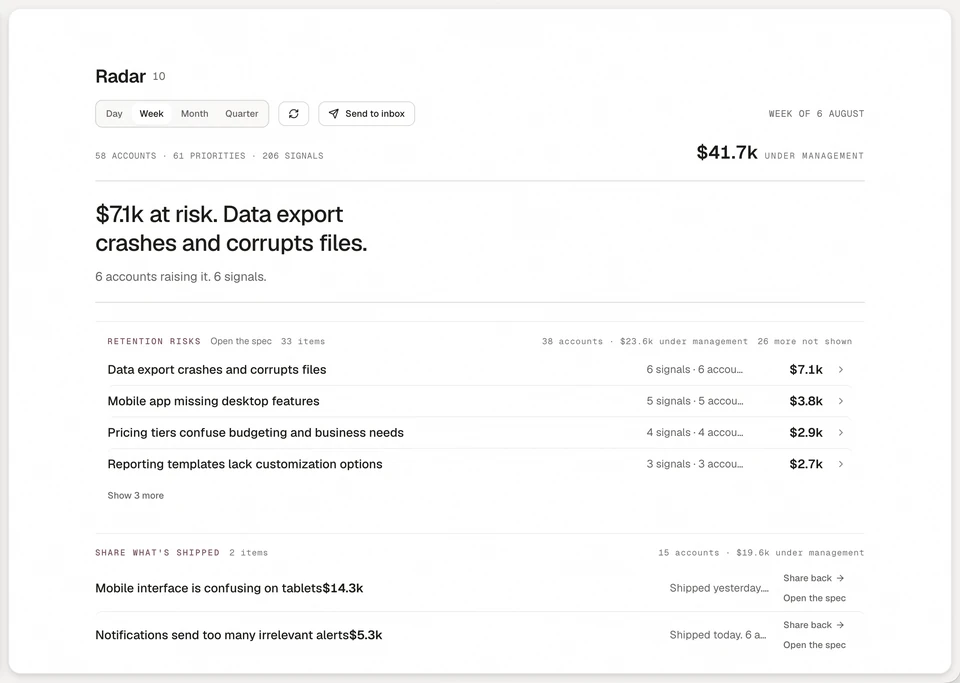
Annsa is AI agent management, the source of direction for your team and agents. It keeps what you decided before the build next to what happened after, so "did it work" has an answer you can check. A person makes the call.
- The definition of worked sits on the spec. Each priority's spec has the why, the customer evidence and Done When lines. You, your agent over MCP or Ask writes it.
- Shipping keeps receipts. Your agent checks each Done When line and records a receipt: a test, a staging URL or a thread you can follow. A line it could not check is labeled unchecked, and that is your call.
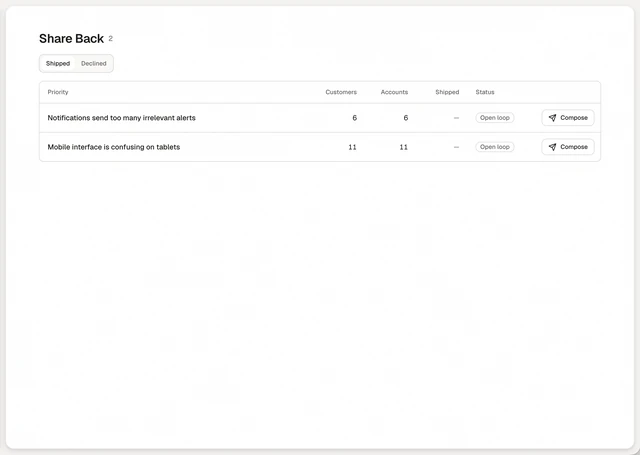
- The people who asked are on the work. Their exact words, the account and its revenue stay on the priority, and when it ships Share Back drafts a note to each of them for you to review and send. After you send it, the priority shows who heard back.
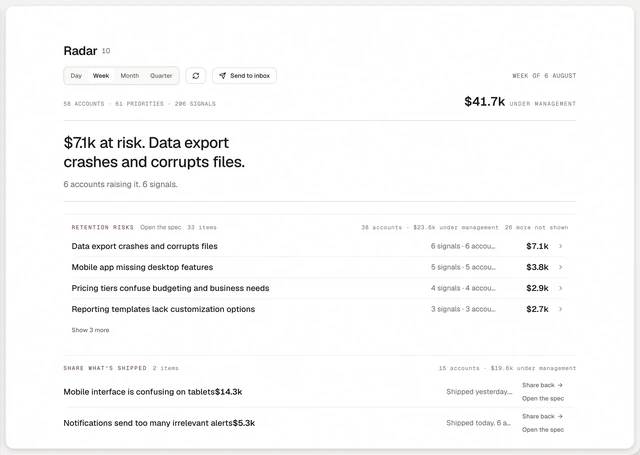
- Radar shows what shipped and whether it worked. A daily or weekly read of what is at risk, what is worth the most and what is growing, with what shipped. Each company is counted once, so one loud account does not read as a trend. Every line opens its priority with the evidence and the spec. See Radar and Radar in the docs.
- Work that did not land comes back. When customers raise the same problem after a ship, the priority reopens as came back, with the result of the last ship on its row.
- The record stays. A shipped priority keeps what was built, the pull request, each Done When line with its receipt and what the agent learned. See what a shipped priority records.
Annsa does not replace your product analytics. It holds the evidence, the spec and the outcome side by side, and tells you what moved.
| What you do by hand | What it costs | How Annsa does it |
|---|---|---|
| Decide what "worked" means after you look | You find a win every time | Done When lines and evidence are on the spec before the build |
| Remember who asked, to check with them | The best signal goes unasked | The people who asked stay on the priority, with a note drafted to each |
| Notice when a fix did not land | You hear months later | The priority reopens as came back when customers raise it again |
| Check every tool for what moved this week | An hour every Monday | Radar sends a short read of what shipped, what is rising and what is at risk |
Sources
- Kerry Rodden, Hilary Hutchinson and Xin Fu, Measuring the User Experience on a Large Scale: User-Centered Metrics for Web Applications, CHI 2010: the HEART framework and "a process for mapping product goals to metrics".
- Wikipedia, Rule of three (statistics): the 0 to 3/n interval when an event has not occurred.
Questions people ask.
How do you measure the success of a new feature?
What is feature adoption?
What metrics should you track after a product launch?
How do you know if a feature worked with a small number of users?
When should you roll back a feature?
A guide to what shipped and whether it worked.
- 01
What does product analytics tell me?
What people do inside the product: which features they use, where they stop and how often they return.
- 02
What should I have ready before I ship?
The evidence, the Done When lines checked, who to tell and the note, and a way back.
- 03
How do I see what shipped and whether it worked?
A shipped priority keeps its Done When lines with receipts, so you can check what the ship did.
- 04
How do I hear what moved without digging?
A daily or weekly briefing: rising requests, shipped priorities and quieter feedback.