Customer feedback analysis: how to find what your customers are telling you
The short answer
Customer feedback analysis turns what customers say into a short list of problems, each with the people, accounts and revenue behind it. Keep every quote with its account, group by the problem underneath rather than the wording, count companies not mentions, and talk to a few customers to learn why. Annsa keeps that evidence on each priority.
Customer feedback analysis is the step between hearing customers and deciding what to build. Skip it and you build whatever was said last.
TL;DR
- Keep every piece of feedback with the person, the account and their exact words.
- Group by the problem underneath, not the wording. Ten phrasings can be one problem; one phrase can hide two.
- Count companies, then revenue. Ten messages from one account is one voice.
- A pattern tells you what. Three to five short conversations tell you why.
- The output is a ranked priority with its evidence attached, not a report.
When to use this: as soon as feedback arrives from more than one place, or you catch yourself building the request you heard most recently. When not: with a handful of customers you talk to every week, just read what they send and keep notes. The method pays off once there is more feedback than you can hold in your head.
What is customer feedback analysis?
It is the step between hearing customers and deciding what to build, and one part of customer feedback management. Customer feedback is what someone said. A customer insight is a conclusion drawn from many pieces of it: what the pattern is and why it exists. Analysis is the work that gets you from one to the other.
Three outputs are worth aiming for:
- A finding: "6 accounts described trouble finding last month's invoices." It is a count with evidence.
- An insight: "They look for old invoices because their accountant asks every quarter, and our search only covers 30 days." It explains why, and it can change what you build.
- A priority: "Accounts can find any invoice from the last 2 years in one search," with the 6 accounts, their revenue and their words on it. This is the one your team, or your agent, can act on.
Most feedback analysis stops at the first output and calls it done. A word cloud or a sentiment score is a summary of a summary. The value is in the second and third steps.
If you want the short version of this method, the voice of customer post covers it in 6 minutes. This page goes deeper on each step and on what AI changes.
Where does customer feedback come from?
From more places than you think, and each one has its own bias. Knowing the bias is half the analysis.
| Source | What it's good for | What it misses |
|---|---|---|
| Support chats and tickets | What's broken or confusing, in the moment | Customers who give up without asking |
| Sales and onboarding calls | What prospects expect, and why they buy or don't | What happens after month 2 |
| Shared Slack channels | Fast, specific, often from your best accounts | Accounts that aren't in a channel |
| Surveys | Reaching quiet customers, a trend over time | The why, unless you ask an open question |
| Interviews | The story behind a problem | Scale: you'll do a few, not hundreds |
| Reviews and social posts | How you're described in public | Mild experiences; people post when delighted or furious |
| Cancellation reasons | Why people leave | The ones who leave without saying |
| Behavior in the product | What people do, which can differ from what they say | Why they do it |
| Your agents' findings | What's slow, fragile or confusing in the code | Whether any customer cares |
Two biases show up in almost every source:
- Polarization. People with strong reactions write in. Mild frustration and quiet satisfaction mostly go unsaid. See feedback polarization.
- The silent majority. Many customers never write at all. They work around a problem, use a feature less, or leave. See silent majority.
You can't fix either bias with a formula. You can remember the middle is missing, ask quiet customers directly, and check behavior against what people say. The guide to getting customer feedback without being annoying covers asking well, and the customer feedback hub covers pulling every source into one place.
Keep the speaker attached
Whatever the source, capture three things with every piece of feedback: who said it, which account they belong to, and their exact words. A quote with no account behind it can't be weighted, and you can't tell the person when it ships. This is the single most useful habit in feedback analysis, and the easiest to skip.
How do I group feedback by problem, not by wording?
This is the step that makes everything else work. Get it wrong and every count downstream is wrong too.
Customers describe the same problem in different words, and different problems in the same words. Keyword tags miss both. Group by what the customer was trying to do, and what got in the way.
Same problem, different words
- "The CSV export takes two minutes."
- "I wait ages for the download."
- "Exporting is painfully slow on big reports."
One problem: exporting a large report is slow. Three voices. Fold them into one group.
Same words, different problems
- "Export to PowerPoint, please."
- "Export doesn't include the filters I set."
Both say "export." The first is a request for a new format. The second is a bug in the existing one. Keep them apart, and note that the second is probably broken while the first is a wish.
Rules that keep groups honest
- One message can hold two problems. "Search is slow and I can't filter by date" is two signals. Split it.
- One customer saying it twice is one voice. Count the person once, however often they write.
- Name the group as what becomes true for the customer. "Find any invoice in one search" beats "search improvements." A good name tells you whether a new piece of feedback belongs.
- Split a group that grew too wide. If the quotes in one group need two different fixes, it is two groups.
- Note the intent. Is it a bug (something broken), a feature (something new), an improvement (friction in something that exists) or praise (something worked)? Praise is evidence too: it tells you what not to break.
A useful test: read the quotes in a group out loud. If one fix would make all of those customers happy, the group is right.
Why count accounts and revenue, not mentions?
Because mentions measure who writes the most, not who needs it the most.
Say one enthusiastic customer posts in your Slack channel every day about a dashboard tweak. After a month you have 20 mentions. Meanwhile 5 different companies each mentioned once, on a call, that they can't get their data in from a spreadsheet. By mentions, the dashboard tweak wins 20 to 5. By accounts, the import problem wins 5 to 1. The second count is the true one.
So count in this order:
- Separate accounts. How many different companies are behind this group? Count each company once, however many people there wrote.
- Revenue. What do those accounts pay you? Unknown revenue is unknown, not zero. Fill it in for the accounts whose worth you know.
- Urgency. Is it costing them now (they can't finish, they're threatening to leave, a renewal is close), or is it a nice-to-have?
Show the number of mentions on the row, because it is useful context. Just don't sort by it.
Every counting rule picks a side
Be honest about what your rule favors. Counting accounts favors breadth: many small customers outweigh one big one. Counting revenue favors your largest customers. Recency favors whoever wrote last. None of these is wrong, but each decides whose problems count. Choose on purpose, and use the bets you set for the quarter to decide which one leads. See customer feedback prioritization.
How do I find the "why" behind a pattern?
Talk to a few of the customers in the group. Three to five short conversations is usually enough to turn a finding into an insight.
A pattern tells you what customers said. It rarely tells you why. "6 accounts want faster export" could mean the export is slow, or that they don't trust your reports and are rebuilding them in a spreadsheet. Those need different fixes, and you can't tell them apart from the feedback alone.
How to run the conversation
- Pick from the group. Choose customers whose quotes are in it, ideally from different-sized accounts.
- Ask about the last time. "Tell me about the last time you exported a report. What were you about to do with it?" Ask about what happened, not what they'd like. "Would you use a faster export?" gets a polite yes and teaches you nothing.
- Follow the workaround. "What do you do now instead?" A spreadsheet, a manual step or a teammate who does it every Friday shows the problem is real and how much it costs.
- Listen for the job behind the request. The request is their guess at a fix. The job is what they are trying to get done.
- Keep it short. 15 to 20 minutes is enough when you're asking about one pattern.
- Write it down the same day. Their exact words, the account, the date and the one thing you learned. A conversation not written down is gone by Friday.
The customer interview entry has the basics, and product discovery has a full 30-minute script.
What you're listening for
Two or three conversations in, you'll notice the same reason coming back. That reason is the insight. Write it as one sentence that would change a decision. If it changes nothing, it is still a summary: go back for one more call.
How do patterns turn into priorities?
An insight that never reaches the work list was a report. The last step is making it a priority your team, or your agents, can pick up.
- Give it a title that says what becomes true. "Accounts can find any invoice from the last 2 years in one search." Nine words or so, in words a customer would use.
- Attach the evidence. The accounts, their revenue and three or four of their exact quotes. Not your summary of them: their words.
- Add the why. The one-sentence insight from your conversations.
- Place it. Which bet does it serve this quarter, if any? Is it broken (a person marks P0 or P1), or something customers asked for?
- Rank it against everything else, using the same order every time: inside your bets, broken first, then what customers asked for, then ideas. The prioritization frameworks guide covers the order and when a score helps.
- Write down how you'll know it worked. What should the customers who asked be able to do afterwards?
Keeping the customer's words on the priority matters more than ever when agents build. An agent working from "improve search" will build something. An agent working from six quotes about quarterly accountant requests will build the right thing. The post on connecting insights to product work goes further on this hand-off, and feature request triage covers the day-to-day sorting.
Close the loop
When the work ships, tell the people who asked. It's the cheapest way to get more feedback: customers who see their words turn into a change keep telling you things.
What does a month of feedback analysis look like?
A hypothetical example. Say a five-person team sells scheduling software to 60 small clinics. In October they collect 140 pieces of feedback: 70 from support chats, 30 from a shared Slack channel, 25 from a survey and 15 from call notes.
Step 1, group by problem. After splitting messages that raise two things and merging the ones that describe the same thing, they have 22 groups. Most have one or two accounts. Five have more.
Step 2, count accounts and revenue.
| Group | Mentions | Accounts | Revenue a month | Intent |
|---|---|---|---|---|
| Reminder texts arrive late | 31 | 4 | $1,600 | Bug |
| Patients can't reschedule themselves | 18 | 11 | $3,300 | Feature |
| Calendar is slow on Mondays | 14 | 7 | $2,800 | Improvement |
| Want a dark theme | 12 | 2 | $400 | Feature |
| Love the new waitlist | 9 | 8 | $2,600 | Praise |
By mentions, late reminders lead with 31. Looking closer, 22 of those 31 came from one clinic's office manager. By accounts, self-rescheduling leads with 11.
Step 3, find the why. The founder calls four clinics from the rescheduling group. Three say the same thing: their front desk spends the first hour of each day returning voicemails from patients who want to move an appointment. The insight: "Clinics want patients to reschedule themselves because front-desk time is their bottleneck, not because patients asked." That changes the design. The fix isn't a patient app. It's a reschedule link in the reminder text they already send.
Step 4, priorities. The late reminders go to the top of the broken group anyway: 4 accounts is fewer, but a late reminder means a missed appointment, and the founder marks it P1. Self-rescheduling becomes the top customer request, with the insight and 4 quotes on it. The dark theme waits. The praise for the waitlist goes in the notes: don't break it.
The team went from 140 messages to 3 decisions in about a day of work. The number that mattered was the account count, and the sentence that mattered came from four phone calls.
What questions are worth asking every week?
A short, fixed set of questions keeps analysis from becoming a quarterly project. Ask the same five of your feedback every week. Each one should take a minute to answer if your evidence is in one place.
- What is rising? The theme, the number of accounts (and last week's), one exact quote.
- What broke? What stopped working, who hit it, when and whether it is still happening.
- Who is at risk? The account, what it pays, the words or event that worries you.
- What did the last ship change? Before and after: fewer reports, a quote, or "no change".
- What are the biggest accounts asking for? Top accounts by revenue, what each asked for and whether it matches the most common ask.
End with one decision: build, look closer, tell someone or leave it. The template has them ready to copy: customer insight questions.
Do I need sentiment scores, NPS or tagging?
Not to decide what to build. Sentiment tells you the mood, not what to fix. NPS is a number worth trending over time, not a source of priorities. Keyword tagging splits one problem into five. The only counts that rank work are separate accounts and the revenue behind them; see customer feedback prioritization.
What does AI change in feedback analysis, and what doesn't it?
AI changed the slow parts and left the judgment parts where they were.
What AI changes
- Reading at scale. A model can read 1,000 messages and suggest groups in minutes. The grouping-by-problem step that took an afternoon now takes a coffee.
- Grouping across wording and language. Models are good at seeing that "the download takes ages" and "export is slow" are the same complaint, including when one is in Spanish.
- Asking plain questions. Instead of building a dashboard, you can ask "what have clinics with more than 10 staff asked for this month?" and get an answer with the quotes behind it.
- Your agents read the evidence. A coding agent connected over MCP can read the customer quotes on the priority it is building, so the customer's words reach the code without you copying them over.
- Spotting what's rising. A model can tell you which problem gained the most accounts this week without you reading every message.
What AI doesn't change
- Deciding what matters. Whether a pattern is worth building depends on your bets, your customers and your business. That's a person's call.
- The silent majority. AI reads what was written. It can't read the customers who never wrote. You still have to ask them, and look at what they do.
- The why. A model can guess at reasons. Three conversations with real customers will tell you. Don't let a plausible summary stand in for a phone call.
- Checking the source. AI groupings and summaries can be confidently wrong, and an answer can be a near match when nothing truly fits. Before you act, read the quotes behind the answer. An answer you can't check is a guess.
- Telling customers. A note to the person who asked should come from you, and you should read it before it goes.
The rule of thumb: let AI do the reading and grouping, check its work against the quotes, and keep the deciding and the talking for yourself.
What are the common mistakes?
- Reading only the loudest channel. Usually support. It over-represents what's broken and under-represents what's missing.
- Counting mentions. One prolific customer can look like a trend. Count accounts.
- Keyword tagging. Tags group by wording, not problem. They split one problem into five and merge two problems into one.
- Summarizing away the words. "Improve search" is your summary. "I can never find last quarter's invoice when my accountant asks" is the evidence. Keep the second.
- Losing the account. Feedback with no account attached can't be weighted or answered.
- Calling a count an insight. "40 people mentioned export" is a finding. The insight is why.
- Skipping the conversations. Building straight from a pattern is building from a guess about why.
- Analysis that never reaches the list. A monthly deck nobody acts on is the most expensive kind of report. If the pattern matters, make it a priority.
- Never telling anyone. Customers who never hear back stop writing in, and your feedback gets quieter for the wrong reason.
A quick checklist before you call a pattern done:
- Every quote has a person, an account and a date.
- The group is named as what becomes true for the customer.
- You know how many separate accounts are behind it, and their revenue.
- You've talked to at least three of them, and can say why in one sentence.
- It's on the ranked list, placed under a bet or marked as serving none.
How does Annsa do it?
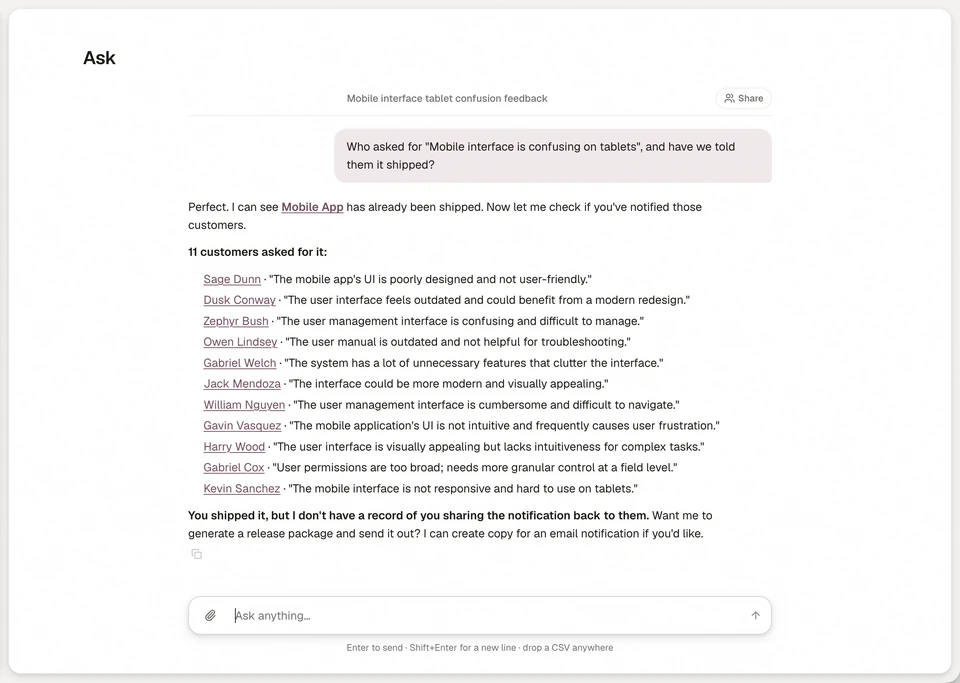
Annsa is the source of direction for your team and agents. It keeps the analysis on this page attached to the work. A person makes the call.
- Feedback arrives with its speaker. Each piece keeps the person, the account and their exact words. Open an account to see its people, contract, priorities and every quote. See accounts.
- Grouped by problem, not wording. Each piece is read for intent, the job it relates to, urgency and sentiment, in 16 languages, and different wordings of one problem fold into one priority. Correct a grouping once and it sticks. See how Annsa classifies feedback.
- Counted by accounts. A priority says how many companies asked, with each company counted once, and the revenue behind them. Mentions are shown, never sorted on.
- Ask answers questions about your evidence. Ask in plain words, in the app, from your agent or in Slack: what are customers saying about checkout, which accounts are affected, why a priority ranks where it does. Every answer points back to the quotes, priorities and people, so you check before you act. See Ask and Ask Annsa in the docs.
- Ranked inside your bets. What a person marked broken comes first, then what customers asked for, then ideas. Your agents, Claude Code, Cursor, Codex and Grok, read the same list and the evidence on it over MCP.
- The loop closes. When a job ships, Share Back drafts a note to each person who asked. You review it and send it.
| What you do by hand | What it costs | How Annsa does it |
|---|---|---|
| Copy feedback from chats, calls and surveys into a sheet | Hours a month, and the account gets dropped | Feedback lands with the person, account and exact words |
| Tag by keyword and merge by eye | Wrong groups, wrong counts | Grouped by the problem underneath, in 16 languages |
| Count mentions in a pivot table | The loudest customer wins | Companies counted once, with revenue |
| Dig through weeks of messages to answer one question | An afternoon per question | Ask answers with the quotes behind it |
| Remember who asked when something ships | Most people never hear back | Share Back drafts a note to each person; you send it |
Ask your team's question in Slack too: see asking Annsa in Slack.
Questions people ask.
How do you analyze customer feedback?
What are the main sources of customer feedback?
What is the difference between customer feedback and customer insights?
Should you count mentions or accounts when analyzing feedback?
Can AI analyze customer feedback?
A guide to ask your evidence.
- 01
How do I ask without digging through chats?
Ask in plain language. The answer comes from your own feedback, priorities and specs.
- 02
Can I ask where my team already works?
Yes. Mention @Annsa in a connected Slack channel and the answer comes back there.
- 03
Who is behind an answer?
Open the account: its people, contract, priorities and the quotes.
- 04
How do I use the answers to decide?
Every answer shows the quotes, priorities and people behind it, so you check it before you act.