How to track feature requests
The short answer
To track feature requests, give every request one home, record the same facts each time (the customer's words, who asked, their account and the problem behind it) and merge requests that mean the same thing into one row. Give each row a status, review the list weekly and tell people when it ships.
On this page · 12 sections
- 01What does it mean to track feature requests?
- 02Where do feature requests come from?
- 03What should each request record?
- 04How do you set up feature request tracking?
- 05Should you track feature requests in a spreadsheet?
- 06What should you look for in a feature request tracking tool?
- 07Are feature voting tools worth it?
- 08How do you track feature requests when agents build?
- 09What does a month of tracking look like?
- 10What mistakes do teams make tracking feature requests?
- 11Copy this
- 12How does Annsa do it?
To track feature requests, give every request one home, record the same few facts each time (the customer's words, who asked, their account and the problem behind it) and merge requests that mean the same thing into one row. Then give each row a status, review the list every week and tell people when their request ships.
- One home for every request, whatever channel it arrived through.
- The same record each time: their exact words, the person, the account, the date, the source and the problem behind it.
- One row per problem, with every request that means the same thing merged under it. Now you can count accounts.
- A status on every row, from new to shipped and told.
- A spreadsheet works while one person reads every row. A tool earns its place when requests come from more places than you can check by hand.
When to use it: from the first few paying customers. When not: before anyone has asked for anything. Then the job is talking to customers, not tracking them.
What does it mean to track feature requests?
Tracking is the record. Triage is the decision. Tracking means every request lands in one place, with enough attached that you can tell who wants it, how much it matters to them and whether it's the same as five others. Feature request triage is what you do with that record: merge, rank, say yes or no.
Most teams track requests without meaning to. They live in a support inbox, a Slack channel, call notes, a sales rep's memory and a spreadsheet somebody started in March. Each one is a partial list. When it's time to choose what to build, you rank the requests you remember, and the ones you remember are the loudest and the most recent.
Good tracking fixes that with three habits: one home, one record shape and one row per problem.
Tracking is the record. Triage is the decision.
Where do feature requests come from?
From everywhere your customers talk to you, and a few places they don't. List your channels first, because a channel nobody captures from is a channel that never counts.
| Channel | What it's good at | What gets lost |
|---|---|---|
| Support chat and email | Real problems, in the customer's words, as they happen | The account, when a teammate copies only the gist |
| Sales and success calls | The why, and requests from accounts that matter | Everything, unless someone writes it down after the call |
| Slack or community channels | Fast, specific asks from engaged users | Threads scroll away within days |
| Surveys | Answers from people who never write in | Context, if the free-text answers never leave the survey tool |
| A public board or form | A place for customers to ask without emailing you | Who is behind each vote |
| Reviews and social posts | What people say when you're not in the room | The link back to an account |
| Your team and your agents | Ideas, and problems found while building | That nobody asked for them, which matters when you rank |
Give each channel an owner, even if the owner is you. The owner makes sure requests get from that channel into the home, with the record filled in. If you use call transcripts, support tools or Slack, much of this can be automatic. Someone still checks that the customer's words came through intact.
What should each request record?
Six facts, every time. Fewer and you can't rank. More and nobody fills it in.
| Field | Example | Why it matters |
|---|---|---|
| Their words | "I copy every booking by hand at the end of the month." | Your summary loses the detail an engineer or agent needs |
| Who | Priya, studio owner | So you can ask a follow-up and tell her when it ships |
| Account and plan | Northside Yoga, paid plan | So you count accounts, not people, and see what's at stake |
| Date | 14 Oct | So you can see what's rising and what's gone quiet |
| Source | Support chat, with a link | So anyone can read the original |
| The problem behind it | Bookings can't get to the accountant | So requests worded differently land on one row |
The last field is the one that makes tracking work. Customers ask for features: "add a CSV button", "connect to Xero", "email me a monthly report". Three requests, one problem. Write the problem in the customer's terms, and the requests stack up under it instead of sitting on three rows with one vote each.
The feature request template has these fields ready to copy.
“I copy every booking by hand at the end of the month.”
How do you set up feature request tracking?
Six steps. The first three take an afternoon. The rest are habits.
- Pick one home. A sheet, a tool or a doc, as long as it's one place. Everything else feeds it.
- Capture from every channel. Each channel gets an owner and a habit: paste the request in with its six fields the day it arrives, or connect the channel so it flows in.
- Merge into problems. When a request arrives, check for a row with the same problem. If there is one, add the quote under it. If not, start a new row.
- Give every row a status. New, merged, planned, building, shipped, told and no. "Told" is a separate step, because shipped and nobody told is the most common gap.
- Review every week. Read what came in, check the merges and look at which rows gained accounts. Thirty minutes is enough for most small teams.
- Tell people. When a row ships, write to everyone who asked. When it's a no, tell them that too, with the reason. Closing the loop covers how.
Ranking happens in step 5, and it's its own skill. Product prioritization covers the order: what's broken first, then what customers asked for, then ideas.
Should you track feature requests in a spreadsheet?
Yes, to start. A sheet with the six fields as columns and one tab per problem is a real tracking system. It's free, everyone can open it and an AI model can help you merge rows.
It stops working when:
- Requests arrive faster than you paste them. Rows lag the inbox by a week, then a month.
- More than one person adds rows. Each person merges differently, and the same problem ends up on three rows.
- The quote gets cut. Under time pressure, people paste "wants CSV" instead of the customer's words, and the evidence is gone.
- Nobody can see what's rising. A sheet shows totals well. It shows this week's change badly.
- Your agents can't read it. If coding agents build from the list, they need the evidence on the row they're building, not a link to a sheet.
When two or more of these are true, a tool will save you more time than it costs.
What should you look for in a feature request tracking tool?
Feature request tracking tools come in a few kinds, and the kind matters more than the brand.
| Kind | Good for | Watch for |
|---|---|---|
| Voting boards | Letting customers ask and upvote in public | Votes count people, not accounts, and favor the loud |
| Tags in your support tool | Requests that arrive through support | Only one channel, and tags group by wording |
| Your issue tracker | Work once it's decided | Requests and tasks mixed up, and the customer's words lost |
| Feedback hubs | Every channel in one list, grouped by problem | Worth it once requests come from several places |
A request without the customer's words is a guess with a timestamp.
Whatever the kind, check it does these:
- Pulls in requests from the channels you actually use, not just its own form
- Keeps the customer's exact words, the person and the account on every request
- Merges requests by problem, not by keyword
- Counts separate accounts and their revenue, not only votes
- Shows what's rising this week, not only all-time totals
- Tracks status through to "told", and helps you write to the people who asked
- Lets your coding agents read the evidence on the work they're building
If a tool fails the second item, skip it. A request without the customer's words is a guess with a timestamp.
Are feature voting tools worth it?
As one channel, yes. As the ranking, no. A public board gives customers a place to ask without emailing you, and that's useful. But people choose whether to vote, so the loud and the early are over-counted. A free user's vote counts the same as your biggest account's, and people vote for the feature they pictured, not the problem behind it. Feature request triage has the longer version.
If you run a board, feed it into your one home like any other channel. Count the accounts behind each problem, not the votes on each idea.
How do you track feature requests when agents build?
Two things change when Claude Code, Cursor, Codex or Grok write the code.

The evidence has to reach the agent. A person building a feature can ask you what the customer meant. An agent builds from what it's given. If the row says "CSV export" and nothing else, the agent guesses at the date range, the columns and who can use it. If the row carries three studio owners' words and their accounts, the spec writes itself and the agent builds the right thing. Keep the evidence on the row, and put the row's evidence in the spec.
Agents add requests too. While building, an agent finds things: a bug next door, a missing check, a slow query. Those are findings, not customer requests, and they belong in the same list, marked as such, so you can rank them against what customers asked for.
And when an agent ships a row, the tracking isn't done until the people who asked are told. That step stays with a person.
What does a month of tracking look like?
This is a hypothetical example.
Say Dev runs a scheduling tool for small clinics, with 45 paying accounts. Requests arrive through support chat, two Slack communities and monthly check-in calls.
Week 1. Dev sets up a sheet with the six fields and owns all three channels himself. Eleven requests come in. Four are about the same problem in different words: "can I block out lunch", "recurring breaks?", "staff keep getting booked at 12:30" and "a way to mark unavailable hours". He writes the problem as "Staff can't block regular time off", and all four go on one row. Four accounts.
Week 2. The weekly review shows the time-off row at 6 accounts, including 2 of his largest. A second row, "Export appointments to a spreadsheet", has 3 accounts. Everything else has one each.
Week 3. The time-off row goes to planned, then building. Dev writes a spec with the six quotes attached, and his coding agent builds from it. While building, the agent files a finding: the booking page doesn't check time zones for staff in a second location. That goes on the list as its own row, marked as a finding.
Week 4. Time off ships. Dev checks it on the live site, then writes to the 6 accounts. Two reply the same day. One asks whether breaks can repeat every other week, which becomes a new request on a new row, in her words. Status: told.
At the end of the month, Dev has 23 requests on 9 rows, one shipped and told, and he knows which 3 rows to look at next.
“staff keep getting booked at 12:30”
What mistakes do teams make tracking feature requests?
- Several homes. Support has a list, sales has a list and the founder has a list. Nobody can count.
- Summaries instead of quotes. "Wants export" is your note. "I copy every booking by hand" is the evidence.
- Rows per request, not per problem. Three features for one problem become three rows with one vote each, and the problem never looks big.
- Counting people, not accounts. Five people at one company is one account.
- No status after shipped. The request is built, and nobody tells the person who asked.
- Tracking without deciding. A list that grows every week and never drives a choice is a filing cabinet. Review it, rank it, act on it.
- Agents building from a title. The row's evidence has to travel with the work, or the agent guesses.
Copy this
## Feature request tracker: one row per problem

| Field | Fill in |
| --- | --- |
| Problem | [what becomes true for the customer, in their terms] |
| Status | new / merged / planned / building / shipped / told / no |
| Accounts | [how many separate accounts asked] |
| Revenue | [what those accounts pay] |

### Requests on this row

| Date | Who | Account and plan | Their words | Source |
| --- | --- | --- | --- | --- |
| [date] | [name, role] | [account, plan] | "[exact quote]" | [link] |

### Decision

- Why it ranks where it does: [one line]
- Who to tell when it ships: [everyone above]
How does Annsa do it?
Annsa is the source of direction for your agents. Feature requests are one of the inputs it keeps in one ranked list, with your roadmap, your ideas and what your agents find.
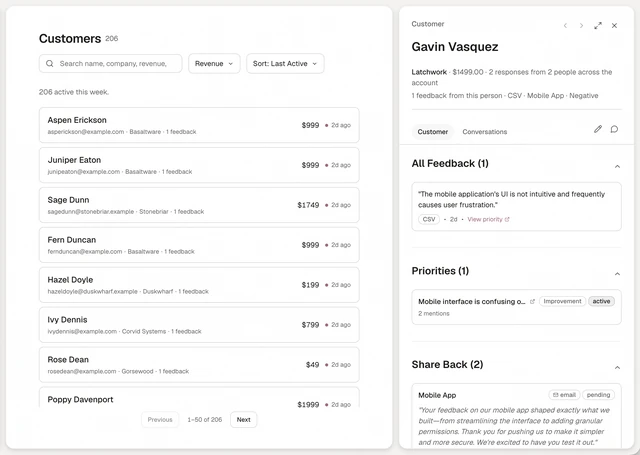
- One home, every channel. Requests come in from Slack, Intercom, call transcripts, surveys, CSV and Google Sheets imports, GitHub, typed in by hand and an API. Each keeps the customer's exact words, the person, the account and its revenue.
- Merged by problem. Annsa groups requests that mean the same thing into one priority, however they're worded, and in 16 languages.
- Ranked with the reason. Within your bets, what a person marked broken comes first, then what customers asked for, then ideas. You make the call.
- Agents read the evidence. Claude Code, Cursor, Codex and Grok read the priority and its spec over MCP, quotes included, and file their own findings into the same list.
- Told when it ships. Each priority moves open, ready, built, shipped, shared. When it ships, Share Back drafts a note to each person who asked, and you review and send it.
See Priorities for how the list works.