AGENTS.md template
The short answer
An AGENTS.md template is a short starter file for your repo root. It covers the project, the exact commands, conventions, layout, what not to touch, how to read priorities and specs over MCP and when to stop and ask. Claude Code can import it with a one-line CLAUDE.md that says @AGENTS.md.
An AGENTS.md template is a starter for the shared rules file your coding agents read before they touch your repo. It tells them what the project is, how to run it, where things live, what to leave alone and when to stop and ask. For the definition, see What is AGENTS.md?. For the thinking behind it, see context engineering.
TL;DR
- Keep it short. Rules an agent cannot check from the code are the ones worth writing.
- Put commands first. Agents run them, so they must be exact.
- Name what not to touch, and when to stop and ask.
- Point agents at your priorities and specs over MCP, so they build what you ranked.
- If you use Claude Code, add one line to CLAUDE.md: @AGENTS.md.
When to use it: you use more than one coding agent, or you keep repeating the same corrections. When not: a throwaway script. A README will do.
An AGENTS.md starter
Copy this into the root of your repo and replace the brackets. Delete any section you do not need.
# AGENTS.md

Inputs: this repo and the facts below.
Outputs: changes that pass the done check, with evidence recorded per Done When line.

## Project
[Name] is [what it is] for [who]. Stack: [languages, frameworks, database].

## Commands
- Install: [command]
- Run: [command]
- Test: [command]
- Run one test: [command]
- Lint: [command]
- Build: [command]
- Use [tool], not [tool].
- A change is done when [commands that must pass] pass.

## Conventions
- [Naming rule]
- [Error handling rule]
- [How tests are written and where they live]
- [Commit message style]

## Layout
- [folder/]: [what it holds]
- [folder/]: [what it holds]

## Do not touch
- [path or file type, and why]
- [path or file type, and why]
- Secrets and .env files.

## Priorities and specs
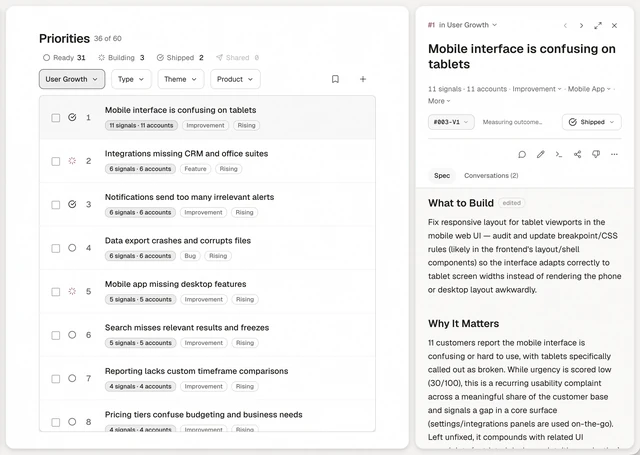
Read the ranked list with annsa.priorities. Read the spec for your priority with annsa.spec. Claim it with annsa.work before you start. When you finish, record evidence against each Done When line, then mark it shipped. A person releases to production.

## Stop and ask
Stop and ask a person if:
- the spec and the code disagree
- the change touches [billing | auth | customer data]
- the change deletes data or cannot be undone
- the change adds a dependency or changes scope
Then continue with the safest option and note what you assumed.

---
In CLAUDE.md, keep one line:
@AGENTS.md
What goes in each section?
Project. Two or three sentences: what it is, who uses it and the stack. An agent that knows the product makes better small decisions.
Commands. The exact commands to install, run, test, lint and build. Add the one that must pass before a change is done. If a command is slow or needs a service, say so.
Conventions. The patterns you want followed that are not obvious from the code: naming, error handling, how tests are written, how a commit message reads. Skip anything a linter already enforces.
Layout. Which folders matter and what lives in them. Five lines is plenty. Skip it if the folders explain themselves.
Do not touch. Generated files, migrations already applied, vendor folders, secrets and anything a person must change by hand. Be specific, with paths.
Priorities and specs. How agents find their work. Tell them to read the ranked list and the spec over MCP before they start, claim the priority and record evidence against each Done When line when they finish.
When to stop and ask. The calls that need a person: scope changes, customer-facing changes, money, security, anything hard to undo, going against your own rules and real choices between options. The human-in-the-loop checklist has a longer version.
What do the best files add?
Three things separate a file agents lean on from one they skim.
- A command for one test. An agent that can run one test file checks its change in seconds instead of waiting on the whole suite. Write it with the placeholder filled in, for example "pnpm test path/to/file.test.ts".
- The tool you use, not the one they guess. "Use pnpm, not npm" saves a broken lockfile.
- Nested files for big repos. You can put another AGENTS.md inside a package or subfolder. The agents.md site says "the closest AGENTS.md to the edited file wins." Keep repo-wide rules at the root and the specifics next to the code they cover.
Size matters too. OpenAI's Codex docs say Codex "stops adding files once the combined size reaches the limit defined by" a setting called project_doc_max_bytes, which is 32 KiB by default. A short root file plus a few nested ones stays well inside that.
How does this work with CLAUDE.md?
Claude Code reads AGENTS.md when there is no CLAUDE.md. If you already have a CLAUDE.md, keep it to one line that imports the shared file, so there is one source of truth:
@AGENTS.md
Put anything Claude Code specific beneath that line. For how that file works, see CLAUDE.md best practices and CLAUDE.md vs AGENTS.md.
An example, filled in
This is an example, made up to show the level of detail. Say a four-person team with a small web app.
- Project: Examplely is a small web app for freelancers to send clients a monthly summary. Next.js, Postgres.
- Commands: Install with pnpm install. Run with pnpm dev. Test with pnpm test. Run one test with pnpm test path/to/file.test.ts. Lint with pnpm lint. Use pnpm, not npm. A change is done when pnpm test and pnpm lint both pass.
- Conventions: Use named exports. Errors go through the shared handler in lib/errors. Tests sit next to the file they cover.
- Layout: app/ holds pages, lib/ holds shared code, db/ holds migrations.
- Do not touch: Anything in db/migrations that has shipped. The .env files. generated/.
- Priorities and specs: Read the ranked list with annsa.priorities. Read the spec with annsa.spec. Claim a priority with annsa.work before you start.
- Stop and ask: If the spec and the code disagree, if a change touches billing or deletes data, or if you would add a dependency.
Notice the example never says "write clean code". Every line is something an agent can act on or check.
What mistakes should I avoid?
- Writing an essay. Long files get skimmed, by people and agents alike. Cut anything that is generic advice.
- Vague commands. "Run the tests" fails when there are three test runners. Write the command.
- Stale rules. A rule that no longer matches the code teaches agents to ignore the file. Review it when the stack changes.
- Putting this week's work in it. AGENTS.md is for rules that last. What to build this week belongs in your priorities.
- Two copies. If CLAUDE.md and AGENTS.md both hold rules, they drift. Import one into the other.
- No stopping rule. Without one, agents guess at the calls that matter most.
To fill this template, an agent takes your repo and a few facts about the project and returns a filled AGENTS.md, which a person reviews before it is committed.
How does Annsa do it?
AGENTS.md holds the rules that last. Annsa holds the work. Your agents connect over MCP, which is remote and needs nothing installed. They read what to build from annsa.priorities, read the spec with annsa.spec, claim the job with annsa.work and record evidence against each Done When line. When a call needs a person, it lands in Needs You. A decision you save as a principle is read by every agent, so you do not repeat it in each file. See the spec and spec-driven development for the part agents read next.