AI agent memory: what your agents remember, and where it should live
The short answer
AI agent memory is what an agent can read at the start of a job that it did not learn in that session: its rules file, its saved notes, your decisions and the spec. Put how you work in AGENTS.md, why you chose in a decision log and what to build in the spec, so every agent reads the same thing.
AI agent memory is everything an agent can read at the start of a job that it did not learn in this session: its rules file, its saved notes, the decisions you made and the spec for the work. Your agents forget because nothing tells them where to look. This page shows where each kind of memory should live, and memory in Annsa shows the shared version.
TL;DR
- An agent has four layers of memory: the context window (this moment), the session (this conversation), files it reads every time (AGENTS.md, auto memory) and the decisions and specs that sit with the work.
- Sorting is the whole game: how you work in AGENTS.md, why you chose in a decision log, what to build in the spec. Mix them and memory rots.
- Memory goes stale quietly. A rule that was true in March and wrong in October does more harm than no rule.
- With several agents, each kind of memory needs one home every agent reads. Decide once, and every agent learns.
Who this is for: you run one or more coding agents (Claude Code, Cursor, Codex or Grok) on a product with customers, and you are tired of explaining the same thing twice. Who it is not for: you are building an agent from scratch and want vector stores and embeddings. The research guides cover that well. This page is about the memory a product builder controls.
What is AI agent memory?
A language model is stateless. Every call starts from nothing, and what feels like memory is text that gets sent back in. Anthropic's engineering team calls one version of this "structured note-taking, or agentic memory": the agent writes notes outside the context window and reads them back later.
For a coding agent working on your product, memory comes in four layers:
- The context window. Everything the agent can see right now: your message, the files it opened, the tool results. It is exact and it is temporary.
- The session. The conversation so far. Long sessions get summarized, or compacted, to fit, and detail drops out when they do.
- Files it reads every time. A rules file such as AGENTS.md or CLAUDE.md, and notes the tool saves for itself (Claude Code calls these auto memory). These load at the start of each session.
- What sits with the work. The decisions you made, the reasons, what you ruled out and the spec for the job in front of it. This is the layer most teams never write down.
The first two vanish when the chat closes. The last two are what you can shape. For what Claude Code keeps on its own, see Claude Code memory, which walks through Anthropic's docs in detail. This page covers memory across every agent you run.
What kinds of memory does an agent have?
Research papers split memory into working, episodic (what happened), semantic (what is true) and procedural (how to do things). Those words help if you are building an agent. If you are directing one, it helps more to sort by where the memory lives and who writes it. In those terms, AGENTS.md is procedural memory: how to do things here. A decision log is semantic: what is true and why.
| Kind | Where it lives | Who writes it | How long it lasts | Good for | How it goes wrong |
|---|---|---|---|---|---|
| Context window | Inside the current request | You and the agent, as you work | This turn | The task in front of it | Fills up, and recall drops as it grows |
| Session | The open conversation | The tool, with summaries when it runs long | Until the chat closes | Following a thread across steps | Compaction drops the detail you said once in chat |
| Rules file (AGENTS.md, CLAUDE.md) | The repository | You, sometimes with the agent's help | Until someone edits it | How you work: commands, conventions, layout | Grows long, picks up stale lines, contradicts itself |
| Tool memory (for example Claude Code auto memory) | One machine, one tool | The agent, about you and the project | Until deleted | Your preferences in that one tool | Other agents never see it |
| Decisions (a decision log, principles) | One shared place every agent reads | A person makes the call; an agent may propose | Until superseded | Why you chose, and what you ruled out | Lives in a chat thread nobody can find |
| The spec | On the job | You, your agent or a helper like Ask | The life of the job | What to build, the evidence and Done When | Copied into the rules file and left there after the job ships |
| The code and its history | Git | Every agent and person | Forever | What exists and when it changed | Says what, rarely why |
| Model training | The model's weights | The model's maker | Until the next model | General knowledge | Out of date for your product, always |
Two things stand out. Only the rules file, decisions and spec are both durable and shared, so those are where your effort pays. And only decisions need a person to make them, which is why they are the layer agents cannot fill on their own.
Where does "product memory" fit?
Product memory is our name for the record that builds up across time: which customers asked, what you decided, what shipped and how it landed. It is decisions plus specs plus outcomes, joined up. Session memory helps one agent finish one task. Product memory helps the next agent start in the right place.
Why doesn't my agent remember what we decided yesterday?
Because the decision lived in a layer that did not survive. Usually one of these:
- You said it in chat. It sat in the session. The session ended, or was compacted, and the line went with it.
- One tool saved it. Claude Code may have written it to its auto memory. Cursor, Codex and Grok cannot read that folder, and neither can Claude Code on your other laptop.
- It is in the rules file, but buried. Line 240 of a 300-line file competes with everything above it. Anthropic's guidance for CLAUDE.md is to stay under 200 lines, because longer files cost context and get followed less.
- It contradicts another line. Two rules disagree and the agent picks one. You never find out which.
- It was never a decision. You leaned one way in a conversation but never wrote down the choice, the reason and what you ruled out. The agent reasonably reads it as open.
Anthropic's engineering team calls the general effect "context rot": as the number of tokens grows, "the model's ability to accurately recall information from that context decreases". More memory is not better memory. The right few lines, in the right place, are.
What belongs in AGENTS.md, a decision log or the spec?
This is the question that fixes most memory problems. Each of the three has a different job, and a line that sits in the wrong one either goes stale or gets ignored.
- AGENTS.md: how you work. Slow-moving facts about the project. The AGENTS.md site describes the file well: "Think of AGENTS.md as a README for agents." Build and test commands, code style, project layout, what never to touch. The site lists Codex and Cursor among the tools that read it, and Claude Code reads it when there is no CLAUDE.md. A CLAUDE.md can import it with @AGENTS.md. See CLAUDE.md best practices and CLAUDE.md vs AGENTS.md for which file each agent reads.
- A decision log: why you chose. Product and technical calls with their reasons and the options you turned down. "We do not build a mobile app this year, because our customers use the product at a desk. Revisit if three paying accounts ask." (A made-up example.) A decision log keeps the date, the choice, the reasons, what was ruled out and when to revisit.
- The spec: what to build now. The job in front of the agent: why it matters, the customer evidence, the files to touch and the Done When lines that say when it is finished. It changes every job. See the spec.
A sorting test
Ask three questions of any line you want an agent to remember.
- Would it still be true if we changed what we build next month? If yes, and it is about how the code works, it goes in AGENTS.md.
- Is it a choice between real options, with a reason? If yes, it is a decision. Log it with what you ruled out.
- Is it only true for this job? Then it belongs in the spec, and it leaves when the job ships.
| The line | Where it goes | Why |
|---|---|---|
| "Run pnpm test before saying a job is done" | AGENTS.md | How you work, true for every job |
| "API handlers live in src/api/handlers" | AGENTS.md | Project layout |
| "We use Postgres row-level security, not app-level checks" | Decision log, with a one-line pointer in AGENTS.md | A choice with a reason that someone will question |
| "No left accent bars on list rows" | Decision log (a principle) | A design call every agent must follow |
| "Onboarding is the focus this month" | Neither file; your ranked priorities | Changes in weeks |
| "A customer asked for CSV export, and their account renews in May" | The spec, as evidence | Customer evidence for one job |
| "Done when the export includes the invoice date column" | The spec | Only true for this job |
The middle row is the one people get wrong. A decision belongs in the log, not in the rules file, because a rules file says what to do and a decision log says why. When someone asks "why don't we just use app-level checks?", the rules file has no answer. The log does. A short pointer in AGENTS.md ("Access rules: see the decision on row-level security") keeps the rules file short and sends the agent to the reason.
How does agent memory go stale?
Stale memory is worse than empty memory, because the agent follows it with confidence. It happens in five ways.
- The world changed and the line did not. "We are on Node 18" stays in the rules file a year after you moved. Check: any line with a version, a date, a name or a number gets read once a month.
- The job shipped and its notes stayed. Someone pasted the spec for last month's feature into the rules file "for context". Now every agent thinks that feature is still in progress. Check: nothing job-specific lives in AGENTS.md.
- A decision was reversed in conversation. You changed your mind in a chat with one agent. The log still says the old thing. Check: when you reverse a call, mark the old entry superseded and link the new one. Never delete it.
- Two memories disagree. The rules file says one thing, the tool's own notes say another. Check: ask the agent which memory files it loaded this session, and read them together.
- The memory was a guess. An agent saved "Priya prefers tabs" after reading one file. Agent-written notes are observations, not decisions. Check: read what your tools saved about you, and delete what is wrong.
Most research on agent memory treats staleness as a hard, open problem, and for an agent with millions of memories it is. For a product team the fix is simpler: keep each kind of memory small enough that a person can read all of it, and give every line an owner.
Can an agent write its own memory safely?
Yes, if a person reads what it writes before it becomes a rule. Agent-written memory is useful and it fails in two quiet ways.
Memory poisoning
A wrong note in shared memory gets obeyed by every later session, with confidence. It can be an honest mistake, like a rule drawn from one bad run. It can also be planted: text in a web page, an issue or a customer message that tells the agent to "remember" something. Either way, the next agent has no way to know the line was never checked. The defense is plain. Let agents propose memory, and have a person accept anything that every agent will follow. Read new lines in your rules file the way you read code in review.
Turning episodes into rules
Agents can notice that the same thing happened three times and suggest a rule. That is the useful half of self-written memory. Keep the suggestion and the rule apart: the suggestion is an observation, and the rule is a decision a person makes.
Skills as procedural memory
Not every how-to belongs in the rules file. A skill holds the steps for one kind of job and loads only when that job comes up. Claude Code's docs put it this way: "Claude uses skills when relevant, or you can invoke one directly." Its docs also describe scoping rules to specific file types with a .claude/rules folder. Both keep the always-loaded file short and still give the agent the steps when it needs them.
What does "decide once" mean?
Decide once means you make a call one time, write it down with the reason and every agent reads it before it asks you again. The opposite is what happens by default with several agents: the same question reaches you in four terminals, worded a little differently each time, and you answer it four times.
Three things make a decision stick.
- It is written as a rule, in one sentence. "Customer-facing copy uses US spelling." Not a paragraph of context. Agents follow short, checkable lines better than long ones.
- It says what it covers. One job, one area of the product or the whole company. A rule about the billing page should not stop an agent changing the settings page.
- A person made it. An agent may notice a pattern and propose a rule. It does nothing until a person accepts it. That keeps the agents' guesses out of the rules every agent follows.
Not every answer should become a rule. "Ship the export without the date column for now" is an answer for one job. "Exports always include a date column" is a rule. Ask yourself: if a different agent hit this tomorrow on a different job, would I want the same answer? If yes, save it as a rule.
What to record with each decision
- The choice, in one line, in words you would say aloud.
- The reason, in one or two lines.
- What you ruled out, and why. This is the part that stops the next agent retrying it.
- What would make you revisit it.
- Who decided, and when.
A decision record template gives you this as a copy block.
How do several agents share memory?
Each agent has its own context window, its own session and often its own saved notes. None of that is shared. What they can share is anything they all read: files in the repository, and tools they all connect to.
The rule that works: one home for each kind of memory, and every agent reads it.
| Kind | One home | Claude Code | Cursor | Codex | Grok |
|---|---|---|---|---|---|
| How you work | AGENTS.md in the repository | Reads it when there is no CLAUDE.md, or via @AGENTS.md | Reads AGENTS.md in the root and subfolders | Reads AGENTS.md before any work | Check its docs for the file it reads |
| Why you chose | A decision log or shared principles | Reads it if it lives in the repository or over MCP | Same | Same | Same |
| What to build now | The spec for each job | Same | Same | Same | Same |
| Tool preferences | That tool's own memory | Auto memory | Its own settings | Its own settings | Its own settings |
Check each tool's docs for the current behavior, because it changes often. The pattern holds either way: keep the shared layers in places every agent opens, and treat each tool's private memory as personal preferences only.
What goes wrong with shared memory
- Two agents write at once. One agent updates the rules file while another is mid-job reading the old version. Keep rules-file edits small and in their own commit, so you can see what changed.
- Agents write rules for each other. One agent adds "never use library X" after a single bad run, and every agent obeys it. Let agents propose rules, and have a person accept them.
- A handoff loses the reason. One agent stops halfway and another picks up. The code shows what was done, not what was tried and dropped. Ask the first agent to write what it ruled out before it stops. See Claude Code handoff.
- Memory forks by tool. Claude Code learns your preference, Cursor does not, and you see two styles in one codebase. Move the preference to AGENTS.md the first time you notice.
For more on running several agents on one product, see how to manage multiple AI agents and your agents don't share a brain.
A worked example
This is hypothetical. Say a three-person team runs Claude Code, Cursor and Codex on a scheduling product with 40 customers.
Monday. Claude Code is building a reminder email. It asks: "Should reminders go out in the customer's time zone or the account owner's?" The founder answers in chat: the customer's time zone, because the person getting the reminder is the one who has to show up. Claude Code finishes the job.
Wednesday. Cursor is building SMS reminders. Same question. Same answer, typed again, worded a little differently. Friday. Codex is fixing a bug in calendar invites, and picks the account owner's time zone, because nothing told it otherwise. A customer in another country gets an invite an hour off.
What went wrong. The decision lived in two chat sessions and nowhere else. Neither the rules file nor any shared place held it.
The fix, with memory sorted.
- Decision log: "Times shown to a person use that person's time zone. Ruled out: account owner's time zone, because the person attending is the one who needs it right. Revisit if we add team calendars." Decided by the founder, Monday.
- AGENTS.md: one line under conventions, "Time zones: see the decision on whose time zone we show".
- The spec for the invite bug: a Done When line, "Invites show the attendee's local time".
Next week a fourth job touches time zones. The agent reads the rule before it asks, and the question never reaches the founder. That is decide once.
What are the common mistakes?
- Treating the rules file as a diary. Every lesson gets appended and nothing gets removed. Past 200 lines, every line is followed a little less.
- Putting this week's priorities in memory. "We're focused on onboarding" goes stale in days. Priorities change faster than anyone edits a file. Keep them in your ranked list, which agents read at the start of each job.
- Pasting customer evidence into AGENTS.md. A customer's words belong on the job they back, as evidence in the spec. In the rules file they lose their context and never leave.
- Logging the choice without what you ruled out. The ruled-out option is what an agent will try next. Write it down.
- Letting each tool keep its own version. Three tools, three slightly different sets of rules. Pick one shared file.
- Letting agents promote their own guesses. An agent's observation becomes everyone's rule without a person reading it.
- Never pruning. Memory with no clean-up day grows until nobody can find the signal.
- Duplicating the code. "The User model has an email field" is in the code already. Memory is for what the code cannot tell the agent: why, and what not to do.
A memory check-up, once a month
- Read your AGENTS.md top to bottom. Delete any line that is about a single job, a date or a customer.
- Delete any line an agent could learn by reading the code.
- Find any pair of lines that disagree, and keep one.
- Read each tool's private memory. Move anything every agent needs into AGENTS.md or the decision log. Delete anything wrong.
- Read the last month of decisions. Mark the reversed ones superseded and link the replacement.
- Check that every decision has a reason and what you ruled out.
- Ask one agent to list the memory files it loaded this session. If a file you rely on is missing, the agent cannot see it.
How does Annsa do it?
Annsa is AI agent management, the source of direction for your team and agents. It holds the two shared layers that do not fit in a rules file: decisions and the spec for each job. A person makes the call.
- Decisions are kept on the work. When you answer an agent's question or sign a priority, the answer stays on the priority with the reason. The next agent, from any tool, reads it before it asks you again.
- Principles are decide once. A principle is a one-sentence rule for one priority, one area or your whole company. Agents can only propose one, and it does nothing until a person accepts it. When a principle settles a question, the agent does not ask. See decisions and principles.
- What was ruled out stays. Options you did not take, and what an agent tried and rejected, stay on the priority, so the next agent does not retry them.
- The spec carries what to build now. Each priority has a spec with the why, the customer evidence, the files and the Done When lines. You, your agent over MCP or Ask writes it.
- Every agent reads the same place. Claude Code, Cursor, Codex and Grok connect over MCP, with nothing to install, and read the same priorities, specs and principles.
- Calls that need a person go to Needs You. Everything else, the agent settles inside the rules you set.
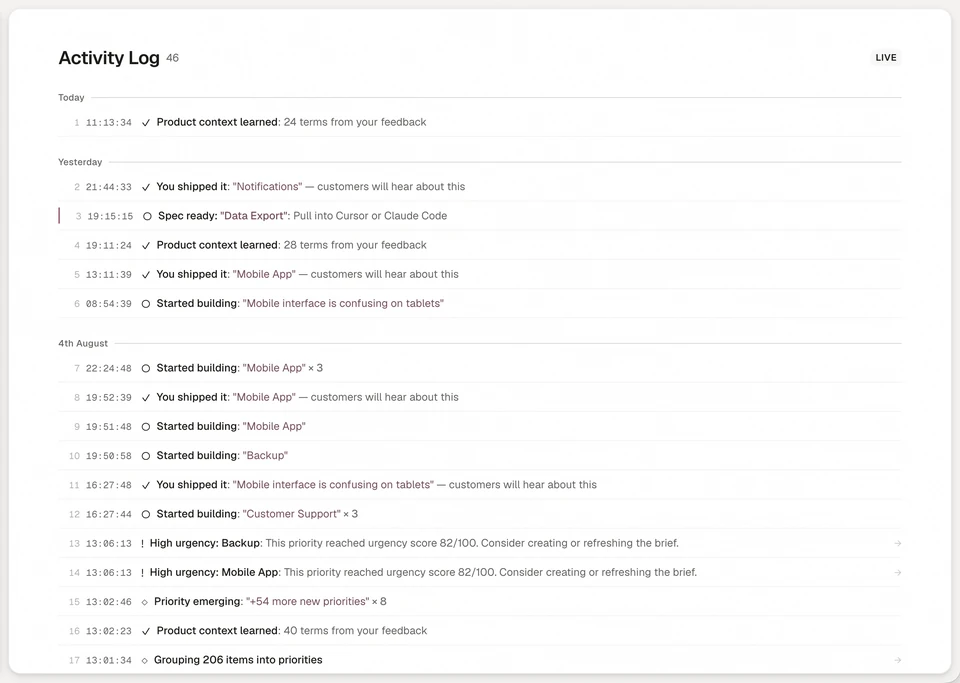
- The history is in the activity log. Ships, corrections and dismissed work show there. Over time, older memories that matter less are folded into a short quarterly summary.
| What you do by hand | What it costs | How Annsa does it |
|---|---|---|
| Answer the same question in each agent's chat | Your day goes to repeat answers | Save the answer as a principle once; every agent reads it |
| Keep a decision log in a doc agents may not open | Agents rebuild what you ruled out | Decisions and ruled-out options stay on the priority, readable over MCP |
| Paste job context into the rules file | The file grows and goes stale | The spec holds job context and stays with the job |
| Check which tool learned what | Memory forks by tool | One shared place for Claude Code, Cursor, Codex and Grok |
Annsa does not write or edit your AGENTS.md or CLAUDE.md. Your rules file stays yours, for how you work. See memory in Annsa, and the release where decide once arrived.
Sources
- Anthropic, Effective context engineering for AI agents, 29 September 2025: context rot and structured note-taking.
- AGENTS.md, the open format's own site: what the file is for and which tools read it.
- Anthropic, Claude Code memory documentation: CLAUDE.md, auto memory and the 200-line guidance.
- Anthropic, Claude Code skills documentation: skills load when relevant.
Questions people ask.
What is agent memory?
What are the types of memory in AI agents?
How do I make several AI agents share memory?
What should go in AGENTS.md and what should not?
Why does my AI agent forget what we decided?
A guide to agent memory.
- 01
What does my agent remember today?
Claude Code keeps CLAUDE.md files and auto memory. The guide shows where each lives and what not to keep there.
- 02
What is worth keeping from one session to the next?
The choice, the reason and what you ruled out. A decision log is that record.
- 03
What should I decide first?
Look at which themes are speeding up, new, fading or gone quiet, and decide the ones that are moving.
- 04
How do I stop answering the same question twice?
Answer once. Annsa keeps the decision with its reason, and every agent reads it on the next job.