CHANGELOG · RELEASE 24 · 26th June 2026
Mention @Annsa in any Slack thread. It answers there.
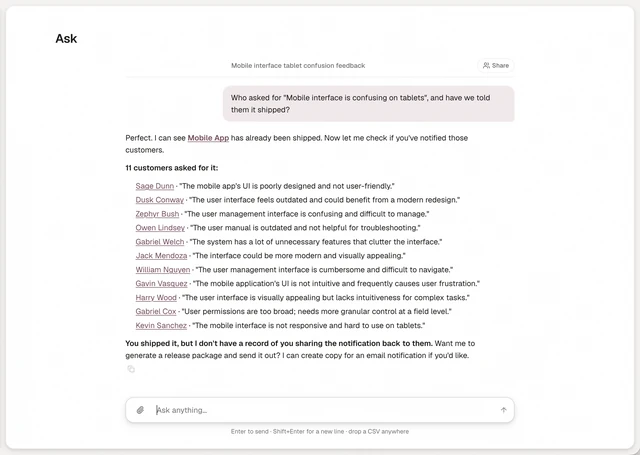
The same answer card you get in the app, in the thread where the argument is.
The answer lived in Annsa. The argument lived in Slack. So the answer arrived late, if it arrived at all.
Mention @Annsa in a thread and it replies in that thread, with the same answer card you see in the app. It reads who is speaking and it remembers who asked.
That second part is the one that pays. When the work ships, the request is still tied to a name, so the person who raised it hears back.
Needs a connected Slack workspace.
How to use it
The answer lived in Annsa. The argument lived in Slack. So the answer arrived late, if it arrived at all. Mention @Annsa in a thread and it replies in that thread, with the same answer card you see in the app. It reads who is speaking, and it remembers who asked. That second part is the one that pays: when the work ships, the request is still tied to a name, so the person who raised it hears back.
- Connect your Slack workspace and pick the channels that matter.
- Mention @Annsa in any thread.
- It answers there, and remembers who asked.
Also in this release
Annsa
Same product, same team, everything where you left it. The name is Annsa.
Ask threads
Every Ask conversation keeps its own link. Browse them, share one with the team and reopen it later.
Build-next verdict
Ask what to build next and get one recommendation, the customer's own words and the accounts driving demand.
Survey analytics
Open a survey on its headline numbers, its sentiment split and the screenshots customers left.
Improvements
Fixed. Roadmap filters did not sort by category. The checkout would not scroll on smaller screens. Feedback that arrived twice across channels was counted twice. Settings carried toggles that did nothing. Annsa asks before it sends anything or does anything destructive. New accounts open straight into a ready workspace. Billing shows your next charge amount. Your profile takes a display name and avatar. Settings regroup from 7 areas into 3: Connect, Notify and Workspace. Help articles show up in the command palette.